Disable System App on LG Phone
How to Disable System App on my LG Phone? I don't need the app any more.
✍: FYIcenter.com
 If you are not planning to use an System app, you can
disable it as shown in this tutorial.
If you are not planning to use an System app, you can
disable it as shown in this tutorial.
A system app is considered to be part of the operating system, you can only disable it. Uninstalling a system app is not allowed.
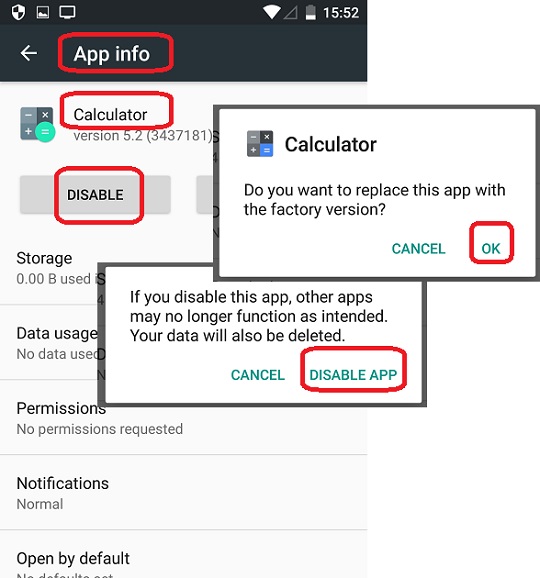
1. Go to "Settings > Apps". You see a long list of apps that are installed on your phone.
2. Tap "Calculator" system app. You see detailed information of the "Calculator" app.
3. Tap on "DISABLE". You see a confirmation message box.
4. Tap "DISABLE APP" to confirm. You see another message box:
Calculator

Do you want to replace this app with the
factory version?
5. Tap "OK" to confirm. The factory version is good enough.
The "Calculator" system app will be disabled.
The following picture shows you how to
Disable System App on your LG Phone:
⇒ Uninstall Third-Party App on LG Phone
2018-01-24, ∼3189🔥, 0💬
Related Topics:

