What Is the UDID Code on My Phone
Q
What is the UDID on my phone?
✍: FYIcenter.com
A
 UDID is a 40-character long Unique Identifier on your iPhone or iPad,
that identifies individual devices.
Examples of UDID are
db72cb76a00cb81675f1,
9907d4ac2b298628d83c.
UDID is a 40-character long Unique Identifier on your iPhone or iPad,
that identifies individual devices.
Examples of UDID are
db72cb76a00cb81675f1,
9907d4ac2b298628d83c.
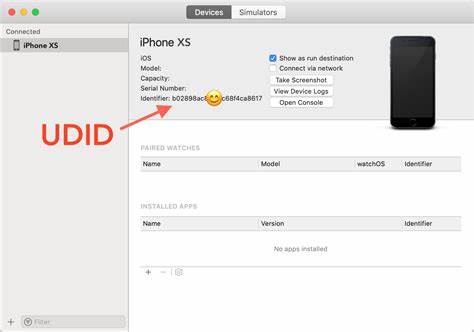
You can find your iPhone UDID by connecting it to iTunes running a desktop computer. Click "DEVICES > Summary" under your iPhone device, you should see the UDID displayed as "Identifier". If not, click the word "Serial" in the summary, the UDID will be displayed.
⇒ What Is the SEID Code on My Phone
⇐ What Is the Serial Number on My Phone
2023-10-10, ≈52🔥, 1💬
Related Topics:


