Take Sphere Picture with LG Phone
How to Take Sphere Picture with my LG phone camera?
✍: FYIcenter.com
 You can follow this tutorial to Take Sphere Picture with your LG phone.
1. Start the camera on your LG phone. You see the picture of the object on the screen.
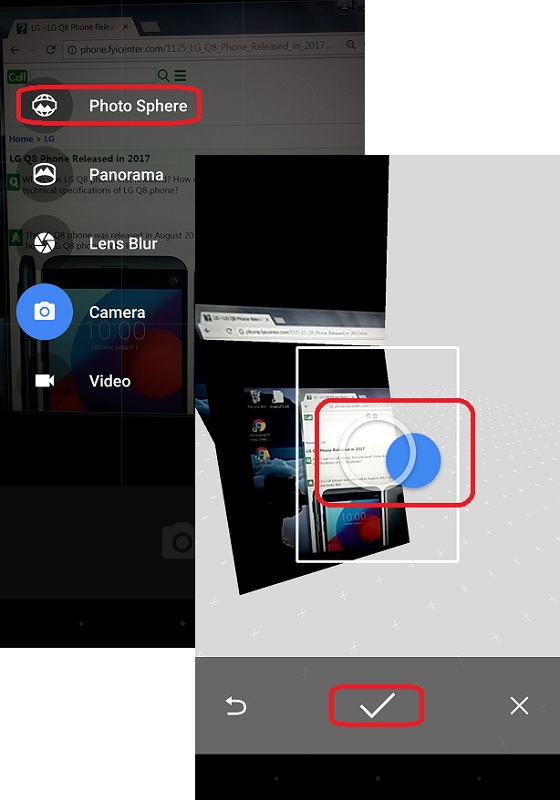
2. Swipe the screen to the right to pull out the left side menu. You see camera operation modes displayed.
3. Select the "Photo Sphere" mode. You see a small picture with a white circle and a blue circle.
4. Move the phone to move the white circle to match the blue circle position. You hear the camera shutter taking one frame.
5. Move the phone to right, you see the white moving with you and another blue circle displayed. Keep moving the white circle to the blue circle until another frame is captured.
6. Keep moving the right, left, up, and down to capture more frames until the entire screen is filled with frames.
7. Tap the Check icon to finish the picture.
The following picture shows you how to
Take Sphere Picture with LG Phone:
⇒ Take Panorama Picture with LG Phone
2018-01-24, ∼3629🔥, 0💬
Related Topics:

💬 2025-06-28 alan.nugent: Cannot find my Pin number. Can you help


