IMEI and ICCID Info on Apple new iPhone
How to get see the IMEI and ICCID info on my Apple new iPhone? I only see the "Hello" screen.
✍: FYIcenter.com
 If you see a "Hello" screen on your iPhone, that means you have a new iPhone,
or an iPhone has been deactivated.
If you see a "Hello" screen on your iPhone, that means you have a new iPhone,
or an iPhone has been deactivated.
If you want activate your iPhone to be able to receive and make phone calls, you need to two pieces of information:
- IMEI number - IMEI (International Mobile Equipment Identity) is the serial number that identifies your iPhone.
- ICCID number - ICCID (Integrated Circuit Card Identifier) is the serial number that identifies a SIM (Subscriber Identification Module) card, which is given to you by your cell phone service provider.
The IMEI number is printed on the back of you iPhone. You can read it from there.
The ICCID number is printed on the SIM card. You take out the SIM card from the SIM card tray on the right side of the iPhone and read it.
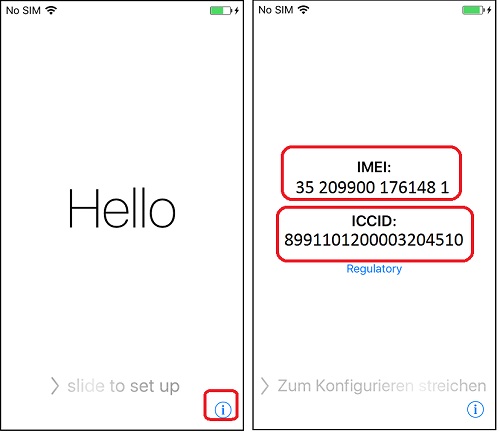
Or you open your iPhone. And tap on the "i" icon near the bottom right corner of the "Hello" screen. You see IMEI and iCCID numbers displayed:
IMEI
35-209900-176148-1

ICCID
8991101200003204510
If there no SIM card inserted in the iPhone, you will see the IMEI number only:
IMEI
35-209900-176148-1

ICCID
Unknown
The picture below shows you how to see IMEI and ICCID info from the "Hello" screen on an deactivated iPhone:
⇒ iPhone Activation Error - No SIM Card
2018-09-13, ≈58🔥, 1💬
Related Topics:

