Set Camera Flash to Auto Mode on iPhone
How to set camera flash to Auto mode on my iPhone? I want to use the flash when taking photos in the dark.
✍: FYIcenter.com
 You can follow steps below to set the camera flash to Auto mode on your iPhone.
The camera will automatically use the flash when taking photos in the dark.
You can follow steps below to set the camera flash to Auto mode on your iPhone.
The camera will automatically use the flash when taking photos in the dark.
1. Open the camera on your iPhone.
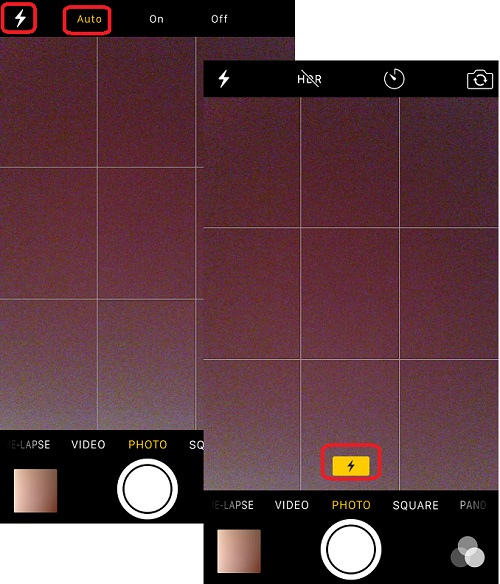
2. Tap the flash icon near the top left corner on the screen.
 You see 3 modes: Auto, On, and Off.
3. Tap on "Auto" to set it to Auto mode.
4. Go to a dark room. You see a yellow flash icon near the bottom of the screen, indicating that the camera is ready to use flash to take photos.
The picture below shows you how to set camera flash to Auto mode on your iPhone:
⇒ Using Camera Self Timer on iPhone
2017-05-05, ∼6280🔥, 0💬
Related Topics:

