Activation Lock - Used iPhone Linked to Apple ID
Why am I getting the "iPhone is currently linked to an Apple ID..." message when trying to activate my iPhone?
✍: FYIcenter.com
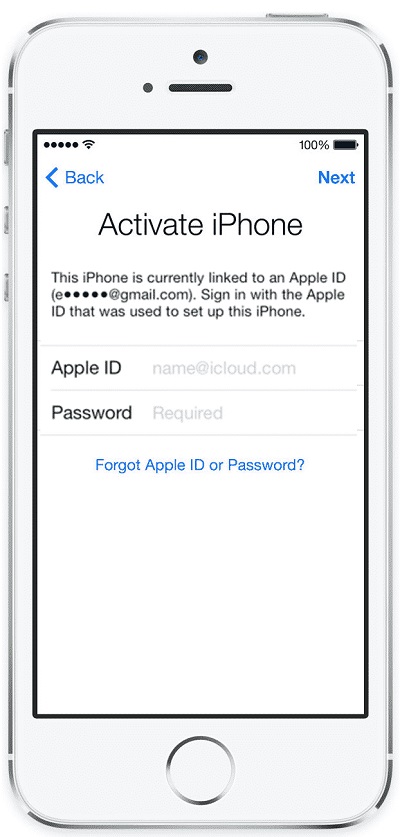
 If you are trying to activate an used phone, you may get the following message
and you will not be able to finish the activation:
If you are trying to activate an used phone, you may get the following message
and you will not be able to finish the activation:
Activate iPhone

This iPhone is currently linked to an Apple ID
(e*****@gmail.com). Sign in with the Apple ID
what was used to set up this iPhone.
You are getting this screen, because the iPhone is activation locked (or iCloud locked) by the previous owner. The iPhone's IMEI number of the iPhone is linked to the old Apple ID of the previous owner in Apple's database.
Since Apple ID is linked to IMEI number of the iPhone, even you put your new SIM card into the iPhone, the iPhone is still linked to the old Apple ID.
The best way to resolve the activation lock issue is to contact the previous owner and ask him/her to remove this iPhone from his/her Apple ID iCloud account.
Or contact apple support and prove to them you are the new owner of the iPhone. They will remove the activation lock for you.
Don't pay anyone one on the Internet who claim that they can unlock the activation lock. It is a scam.
The picture below shows you the activation lock on a used iPhone:
⇒ Transfer SIM Card to New iPhone
2017-05-01, ∼7929🔥, 0💬
Related Topics:

