Changing Photo Aspect Ratio with iPhone Photos App
How to change photo aspect ratio with iPhone Photos app? I want to change my photo to be a square (1:1 aspect ratio).
✍: FYIcenter.com
 The crop and rotate tool in iPhone Photos app allows you to change aspect ratio on your photos.
You can change your photo to square
using these steps:
The crop and rotate tool in iPhone Photos app allows you to change aspect ratio on your photos.
You can change your photo to square
using these steps:
1. Open Photos app and tap on "Albums" near the bottom of the screen. You see your photos listed in different albums.
2. Tap on "Camera Roll" to open the camera roll. You see a list of photo previews displayed.
3. Tap the photo you want to enhance. You see the photo displayed in full size.
4. Tap "Edit" near the top right corner of the screen. You see some editing icons displayed.
5. Tap on crop and rotate icon near the bottom left corner of the screen.
 You see screen changed to crop and rotate mode.
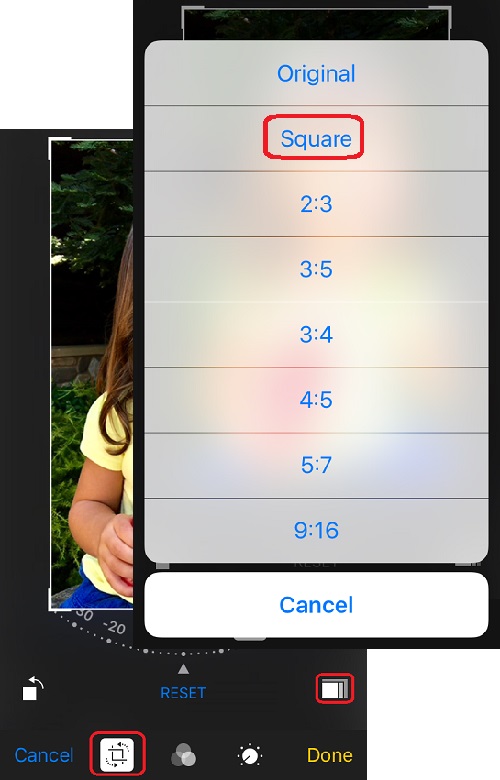
6. Tap on aspect ratio icon near the bottom right corner of the screen.
 You see a list of different aspect ratio options.
7. Tap on "Square". You see photo aspect ration changes to square (1:1 ration).
8. Tap "Done" near the bottom right corner of the screen to save the change.
The picture below shows you how to change photo aspect ratio in Photos app
on your iPhone:
⇒ Rotating Photo 90 Degrees with iPhone Photos App
⇐ Straightening Photos with iPhone Photos App
2021-08-13, ∼7760🔥, 1💬
