Categories:
Android (32)
Apple (iPhone) (829)
Apps (26)
BlackBerry (3)
General (438)
HTC (6)
Huawei (83)
LG (43)
Motorola (50)
Nokia (4)
Palm (10)
Samsung (139)
Sony (1)
Technology (17)
Windows Phone (209)
ZTE (5)
Online Tools:
Tutorial Collections:
Other Resources:
Scan for a Wi-Fi Network
How to scan for a Wi-Fi Network on my Android phone?
✍: Guest
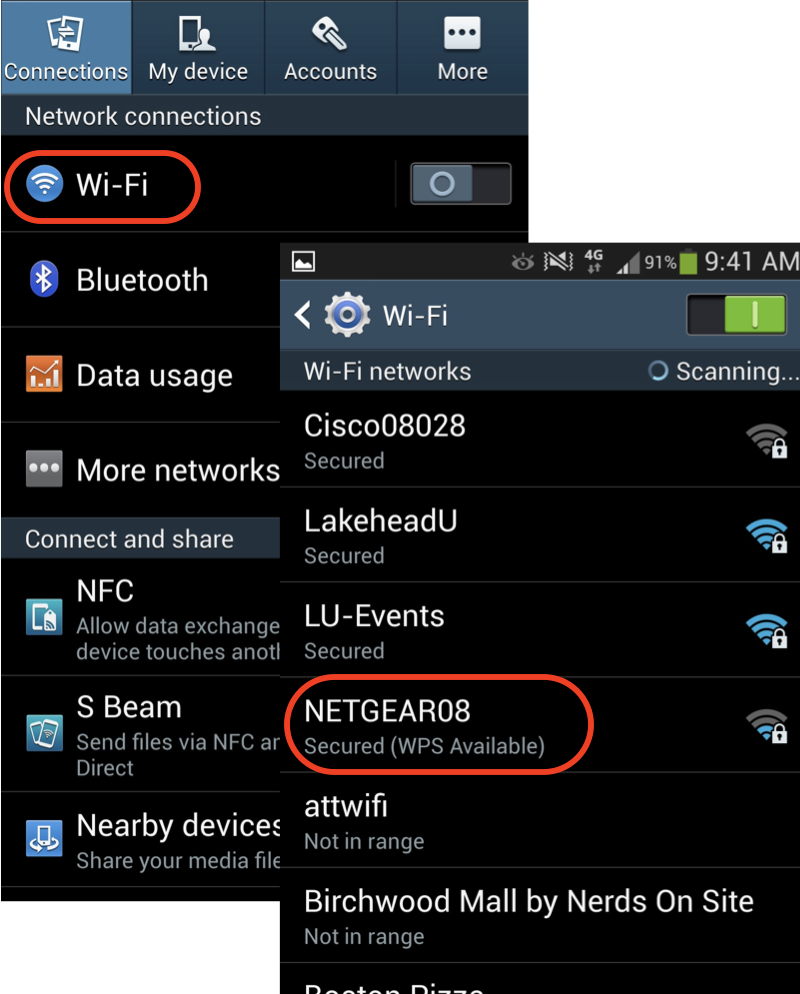
1. Tap "Settings" on the home screen.
2. Tap "Wireless & networks", you see a list of network related settings.
3. Look for the Wi-Fi option. In many cases, there will be a switch here to toggle Wi-Fi on and off. If not, tap the Wi-Fi option first and then turn Wi-Fi on.
4. Your phone will automatically scan for available Wi-Fi networks within range, and display them with their SSIDs.
5. Tap on a SSID to see detailed information.
⇒ Select and Join a Wi-Fi Network
⇐ Find the Wi-Fi Network SSID and Password
2013-06-27, ∼5351🔥, 0💬
Popular Posts:
How to change photo aspect ratio with iPhone Photos app? I want to change my photo to be a square (1...
What is Apple iCloud Numbers? Can I use it to create a spreadsheet document? Apple iCloud Numbers is...
Where to find answers to frequently asked questions about SIM (Subscriber Identity Module) Card? Her...
How to save email messages in Samsung "Email" as files? If you have an important email message recei...
When was Samsung Galaxy Note II phone first released? How does Samsung Galaxy Note II phone look lik...