Categories:
Android (32)
Apple (iPhone) (829)
Apps (26)
BlackBerry (3)
General (438)
HTC (6)
Huawei (83)
LG (43)
Motorola (50)
Nokia (4)
Palm (10)
Samsung (139)
Sony (1)
Technology (17)
Windows Phone (209)
ZTE (5)
Online Tools:
Tutorial Collections:
Other Resources:
Scan for a Wi-Fi Network
How to scan for a Wi-Fi Network on my Android phone?
✍: Guest
1. Tap "Settings" on the home screen.
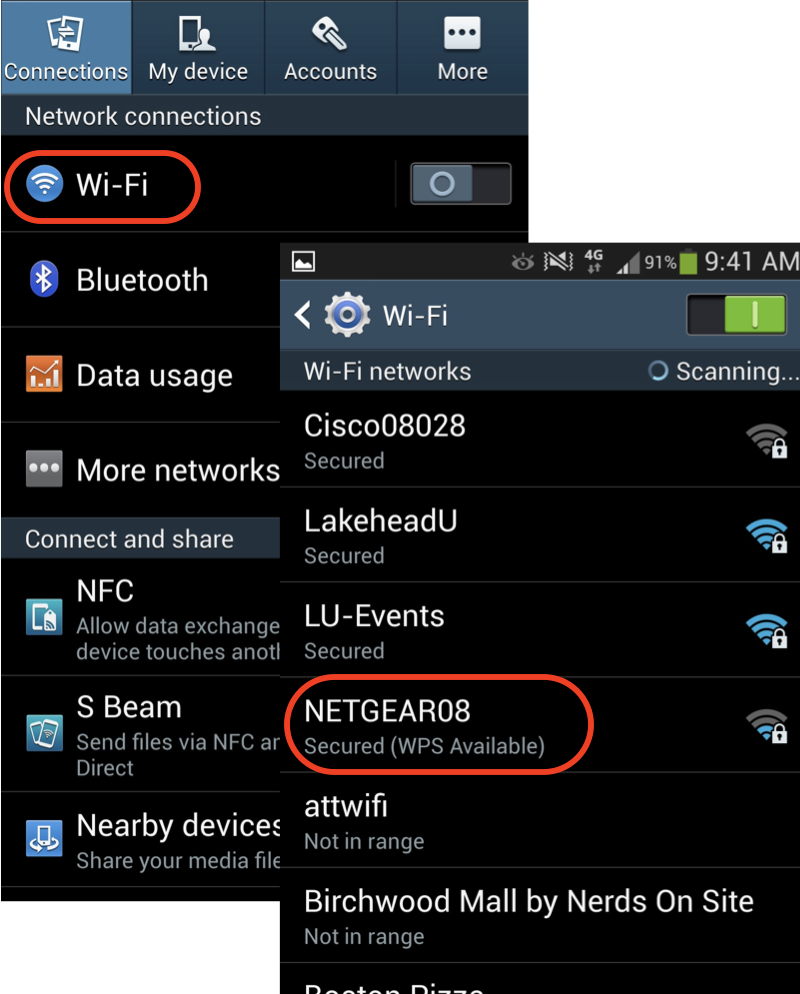
2. Tap "Wireless & networks", you see a list of network related settings.
3. Look for the Wi-Fi option. In many cases, there will be a switch here to toggle Wi-Fi on and off. If not, tap the Wi-Fi option first and then turn Wi-Fi on.
4. Your phone will automatically scan for available Wi-Fi networks within range, and display them with their SSIDs.
5. Tap on a SSID to see detailed information.
⇒ Select and Join a Wi-Fi Network
⇐ Find the Wi-Fi Network SSID and Password
2013-06-27, ∼5306🔥, 0💬
Popular Posts:
How much does the iPhone 6 / iPhone 6 Plus weigh? The new iPhone 6 and even the larger iPhone 6 Plus...
When was HTC Windows Phone 8X first released? How does HTC Windows Phone 8X look like? What are the ...
How to add the number of a new friend in the contact list on my iCloud.com? I can not find the add b...
When was BlackBerry Z10 phone first released? How does BlackBerry Z10 phone look like? What are the ...
Where to find answers to Samsung phone related issues? Here is a list of Samsung phone related issue...