Turn On/Off Bluetooth on Samsung Galaxy
Q
How to turn on and off Bluetooth function on my Samsung Galaxy?
✍: FYIcenter.com
A
 Here are the correct steps to turn on Bluetooth function on your Samsung Galaxy.
1. Go to "Settings > Connections > Bluetooth". You see the Bluetooth switch.
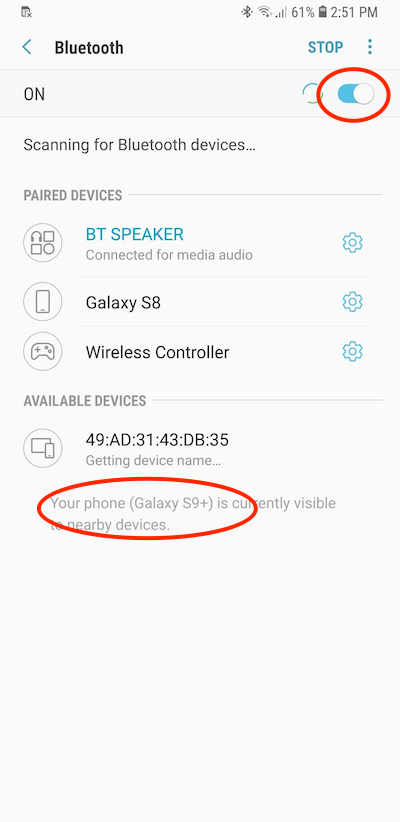
2. Turn the "Bluetooth" switch on. Your Samsung Galaxy will do the following:
- Scan for new other Bluetooth devices in nearby area. You should see a message like: "Scanning for Bluetooth devices...".
- List old Bluetooth devices you have used (paired) before. You should see a list under "PAIRED DEVICES".
- List new Bluetooth devices you have never used (paired) before. You should see a list under "AVAILABLE DEVICES".
- Make your Samsung Galaxy available to other Bluetooth devices. You should see a message like, "Your phone ({name}) is currently visible to nearby devices.".
The Bluetooth function is turned on now. You can start connecting to other Bluetooth devices. Or others can start connecting to your Samsung Galaxy.
The picture below shows you how to turn on Bluetooth on Samsung Galaxy:
If you want to stop using the Bluetooth function, turn the "Bluetooth" switch off.
⇒ Bluetooth Connection - Galaxy to Mac
2022-11-30, ∼1986🔥, 0💬
Related Topics:


