Send File over Bluetooth - Troubleshoot
How to troubleshoot Bluetooth file transfer issues on my Samsung Galaxy? I am getting the "sending failed" error, when sending files from my Samsung Galaxy to my Mac computer?
✍: FYIcenter.com
 Here are the main steps you can follow to troubleshoot Bluetooth file transfer issues.
1. Make sure that your Mac computer is placed close to your Galaxy phone.
2. Make sure that the Bluetooth service is activated on your Mac computer. Go to "System preferences > Bluetooth" to verify.
3. Make sure that your Mac computer is paired with your Galaxy phone. See previous tutorials.
4. Try to send a file from Mac computer to your Galaxy phone. If it works, then your Bluetooth connection is good.
5. Verify the Bluetooth Sharing settings on your Mac computer. This allows the Mac to automatically accept file transfer request.
- Go to "System preferences > Sharing".
- Check "[x] Bluetooth Sharing".
- Set "When receiving items: Accept and Save".
- Set "Folder for accepted items: Download".
6. Try to send pictures your Galaxy to your Mac again as described in the previous tutorial. It should work now.
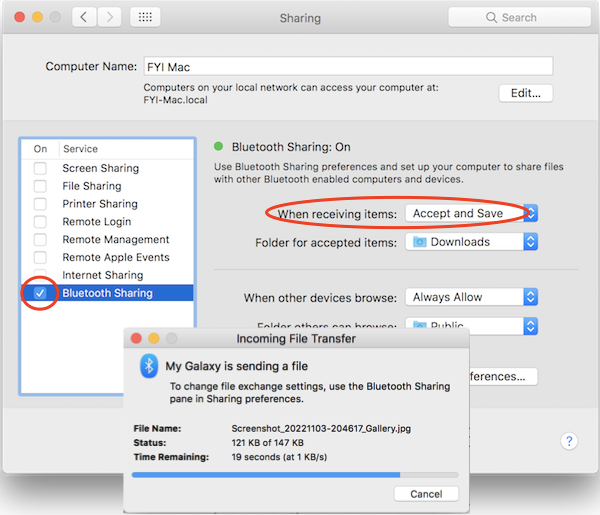
You can also send pictures, audios, videos, PDFs or other files from "My files" by using the "Share > Bluetooth" function from your Galaxy to your Mac.
⇒ Connect Samsung Galaxy with Bluetooth Earbud
⇐ Send File over Bluetooth - Galaxy to Mac Failed
2022-11-04, ∼1731🔥, 0💬
Related Topics:
 USE PHONE NUMBER TO GET IMEI
I’m trying to get a IMEI number using a telephone number how do I do that can you help me? 2022-12-03, ∼3131🔥, 1💬
Unlock
How can I unlock my phone from TracFone? 2023-01-23, ∼2230🔥, 1💬
💬 2023-01-23 FYIcenter.com: You can call TracFone support desk. They will unlock it for you.

