Smart Switch - Transfer Data from iPhone
Can I transfer data from my iPhone to my Samsung phone with Smart Switch?
✍: FYIcenter.com
 Yes, you can transfer data from your iPhone to your Samsung phone with Smart Switch.
But you can not use wireless Wi-Fi network.
You need to use:
Yes, you can transfer data from your iPhone to your Samsung phone with Smart Switch.
But you can not use wireless Wi-Fi network.
You need to use:
- Use a USB cable and a UBS adapter to connect iPhone and Samsung phone.
- Use a computer installed iTunes.
- Use iCloud.
1. Transfer Data from iPhone via USB
1.1. On your Samsung phone to your iPhone with a USB cable and a USB adapter.
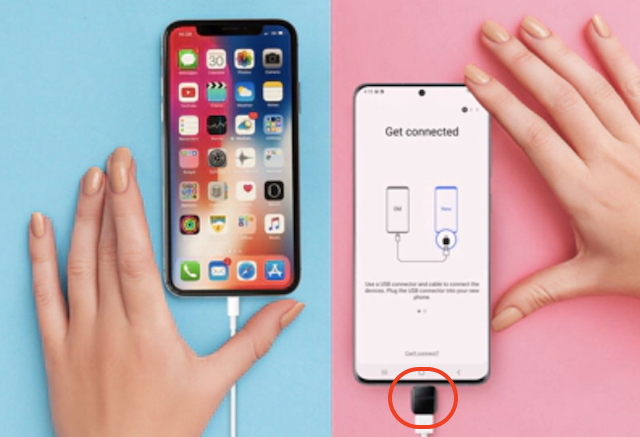
1.2. On your Samsung phone:
- Start Smart Switch. You see the "Transfer your data" screen.
- Tap "Receive data". You see the "Select a source" screen.
- Tap "iPhone/iPad". You see a list of all data types from your connected iPhone. You see the "Connect to iPhone or iPad" screen, if iPhone is not connected yet.
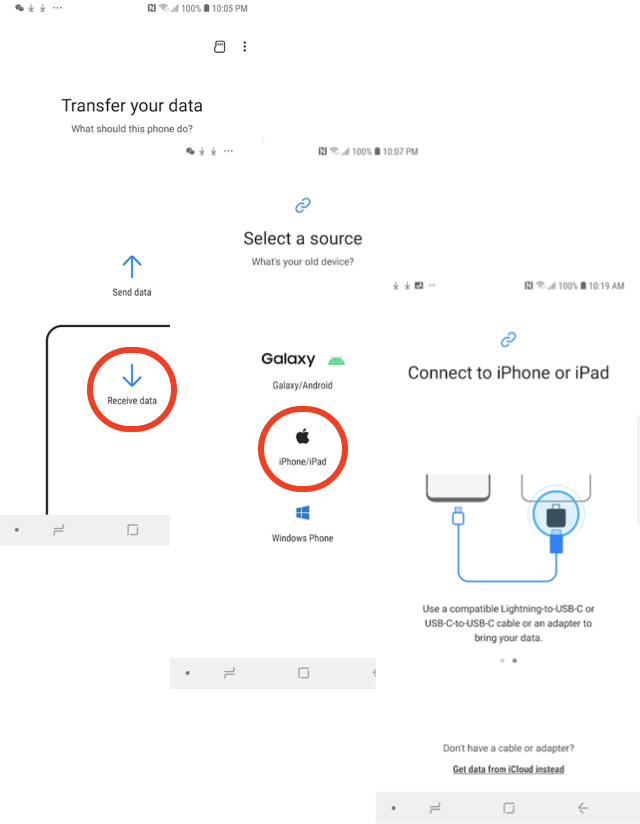
1.3. Tap "Allow/Trust", if you are prompted for confirmation on Samsung phone or iPhone during the connection step.
1.4. On Samsung phone, select all data types and tap "Transfer" to start the transfer.
2. Transfer Data from iPhone via iTunes
2.1. Backup your iPhone data to your computer using iTunes. See iPhone iTunes tutorials for detailed steps.
2.2. Restore your iPhone backup from your computer to your Samsung phone using Smart Switch. See Smart Switch data backup/restore tutorials for detailed steps.
3. Transfer Data from iPhone via iCloud
3.1. Backup your iPhone data to your iCloud account. See iPhone iCloud tutorials for detailed steps.
3.2. On your Samsung phone:
- Start Smart Switch. You see the "Transfer your data" screen.
- Tap "Receive data". You see the "Select a source" screen.
- Tap "iPhone/iPad". You see the "Connect to iPhone or iPad" screen.
- Tap "Get data from iCloud instead". And login to your iCloud account. You see a list of all data types from your iPhone backup.
- Select all data types and tap "Transfer" to start the transfer.
⇒ Install Smart Switch on Mac Computer
⇐ Smart Switch - Transfer Data between Samsung Phones
2022-10-01, ∼2381🔥, 0💬
Related Topics:

