Smart Switch - Restore Backup to Phone
How to restore backup data to my Samsung phone from my computer?
✍: FYIcenter.com
 If have created backups of your Samsung phone data on your computer,
you can restore the entire backup or some files back to your phone
for different situations:
If have created backups of your Samsung phone data on your computer,
you can restore the entire backup or some files back to your phone
for different situations:
- You bought a new Samsung phone, you can restore the backup of your old Samsung phone.
- Your Samsung phone crashed and you have to wipe out all data with the factory reset function, you can restore the backup of your phone.
- You accidentally deleted some important photos or other documents on your phone, you can restore them from the backup.
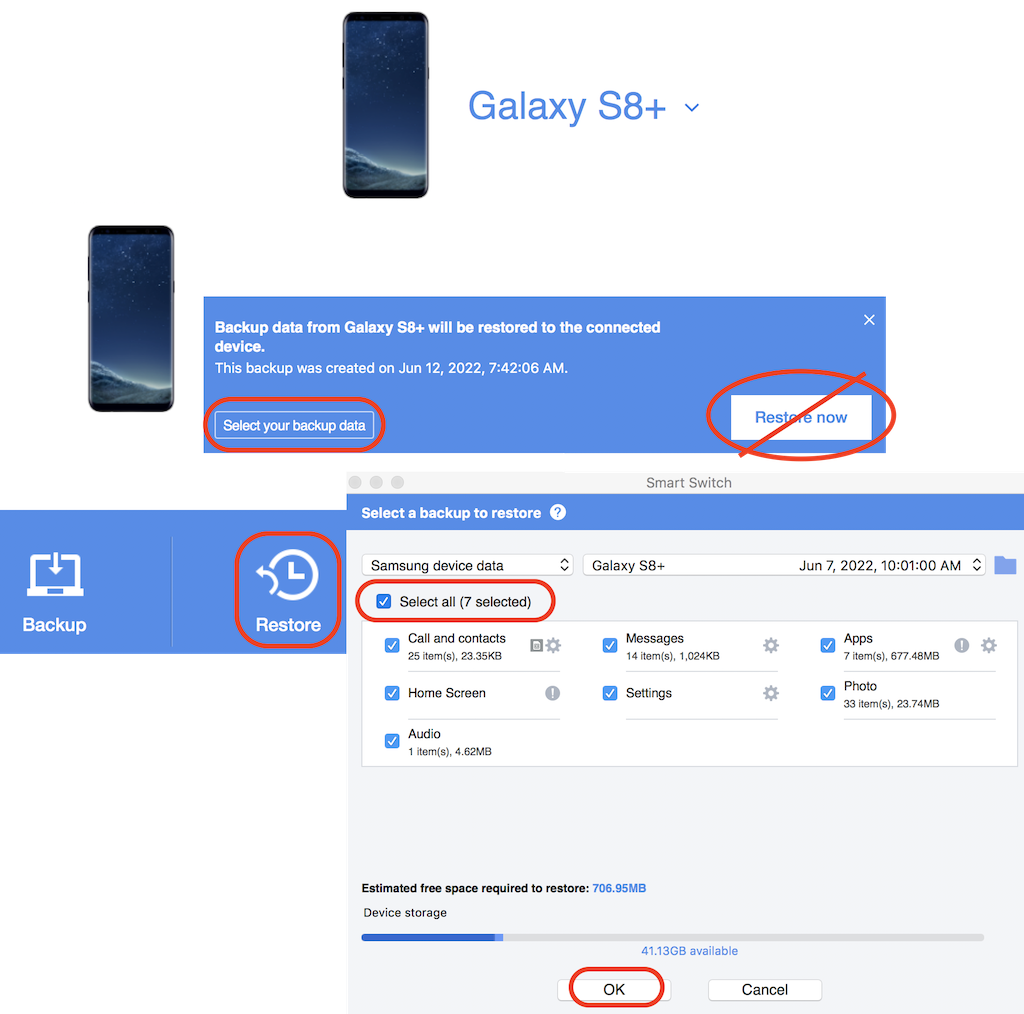
Here are the steps to restore backups from your computer to your Samsung phone.
1. Connect your Galaxy phone to your computer with a USB cable.
2. Run Smart Switch on your computer. You see a message asking you to unlock your Galaxy phone.
3. On your Galaxy phone, unlock the screen and click "ALLOW" to give permission for Smart Switch to access your phone.
4. On your computer, Smart Switch displays your Galaxy phone as a connected device.
5. Click "Restore". You see backup history message displayed.
6. Click "Select your backup data". You see the "Select a backup to restore" screen. Do not use the "Restore now" button, because it will do a full restore of the latest backup.
7. Select a backup from the backup dropdown list based on its backup date. You see a list of data types in the selected backup.
8. If you want to restore the backup to a new/empty Samsung phone, keep all data types selected.
9. If you want to do partial restore, de-select all data types and select only the desired types. For example, select only "Photo", if you want to restore some deleted photos only.
10. Click "OK" and wait for the restore to finish. You see the store summary window.
11. Go back to your phone, review restored data items.
When restoring data to phone, Smart Switch will safely merge restored items with existing items. It will not delete any data items and not create any duplicate items.
If you experience issues on your phone after restoring a backup, restart your phone.
⇒ Smart Switch Backup File Location on Mac
⇐ Smart Switch - Backup Phone Data
2023-02-28, ∼2564🔥, 0💬
Related Topics:

