What Is iPhone Music Library
Q
What is iPhone Music Library?
✍: FYIcenter.com
A
 iPhone Music Library is a database of music files or subscribed music entries
organized by Genres, Artists, Years, Albums, and other category types.
iPhone Music Library is a database of music files or subscribed music entries
organized by Genres, Artists, Years, Albums, and other category types.
When you use iPhone to purchase a music from iTunes store, play a song from Apple Music service, or import a music with iTunes from another device, it will be automatically added to the iPhone Music Library.
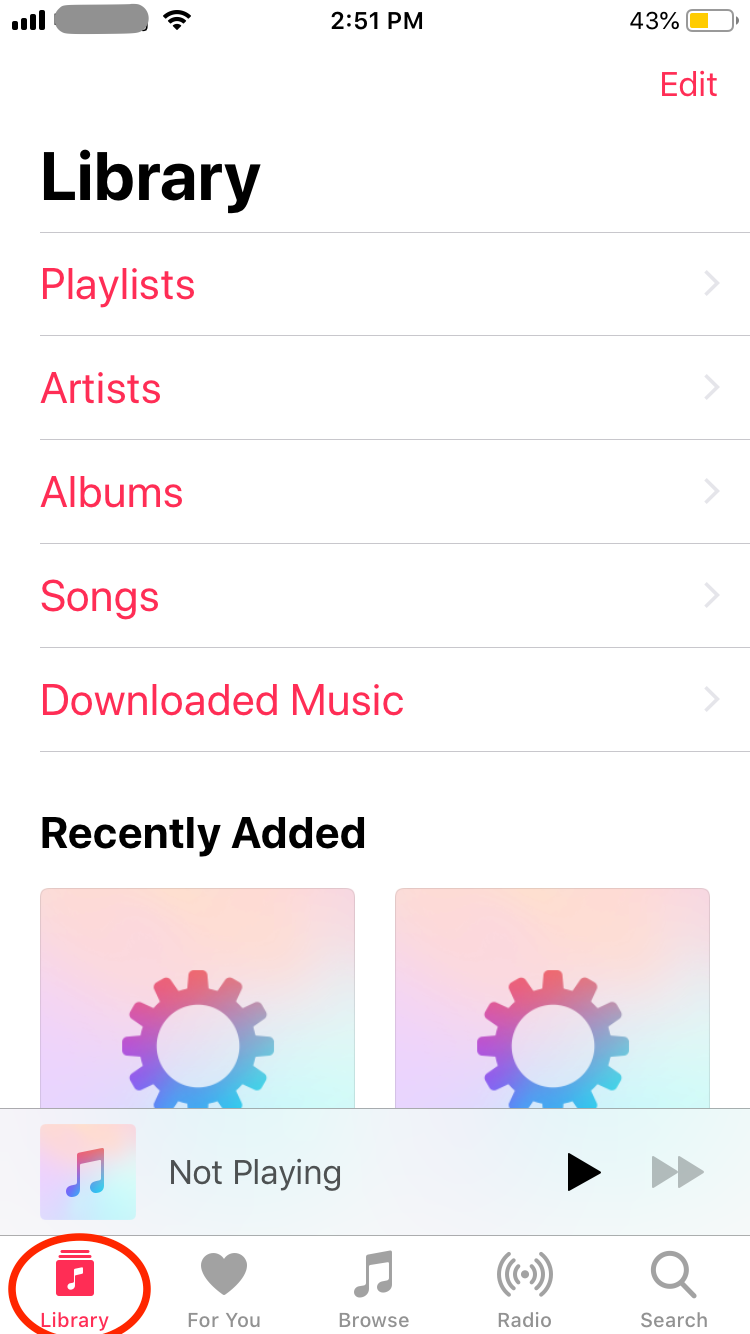
Here are the step to open your iPhone Music library:
1. Tap on Music on your iPhone to open iPhone Music.
2. Tap on the "Library" icon at the bottom. You see see the iPhone Music Library open with the following entries:
- Playlists - List of music in the library you created in the past, so that you can play them continuously in a loop.
- Artists - List of artists to find songs from a given artist.
- Albums - List of albums to find songs by album name.
- Songs - List of all songs sorted by their titles.
- Downloaded Music - List of songs that are imported (downloaded) with iTunes from other devicees.
- Recently Added - List of songs that were added recently.
- (Not) Playing - The song being currently (not) played on the iPhone.
⇒ iPhone Music "Now Playing" Screen
2021-03-21, ∼2401🔥, 0💬
Related Topics:

