Picture Options with LG Phone Camera
Q
How to access options when taking picture with my LG phone camera? I want to turn on the flash.
✍: FYIcenter.com
A
 You can follow this tutorial to access options when taking picture
with your LG phone camera.
You can follow this tutorial to access options when taking picture
with your LG phone camera.
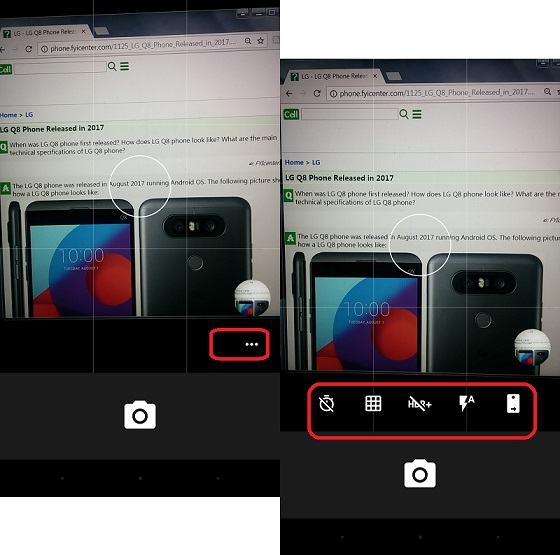
1. Start the camera on your LG phone. You see the picture of the object on the screen.
2. Tap on the 3-dot icon on the lower corner of the picture. You see picture options displayed:
- The 1st one is the timer, which allows you to take a picture with a delayed shutter time.
- The 2nd one is the grid, which provides a grid on screen to help you lineup objects horizontally and vertically.
- The 3rd one is the HDR (High Dynamic Range), which increases dynamic range of luminosity.
- The 4th one is the flash, which gives extra light to close by objects.
- The 5th one is the switch to the front camera to take selfie.
The following picture shows you how to
access options when taking picture with LG Phone Camera:
⇒ Camera Operation Modes with LG Phone
2018-01-24, ∼3175🔥, 0💬
Related Topics:


