My Photo Stream with iCloud for Windows
How to use My Photo Stream with iCloud for Windows? I want to see and share photos in My Photo Stream on my Windows PC.
✍: FYIcenter.com
 If you have iCloud for Windows installed and running on your Windows PC,
you can set up and use My Photo Stream
as described below:
If you have iCloud for Windows installed and running on your Windows PC,
you can set up and use My Photo Stream
as described below:
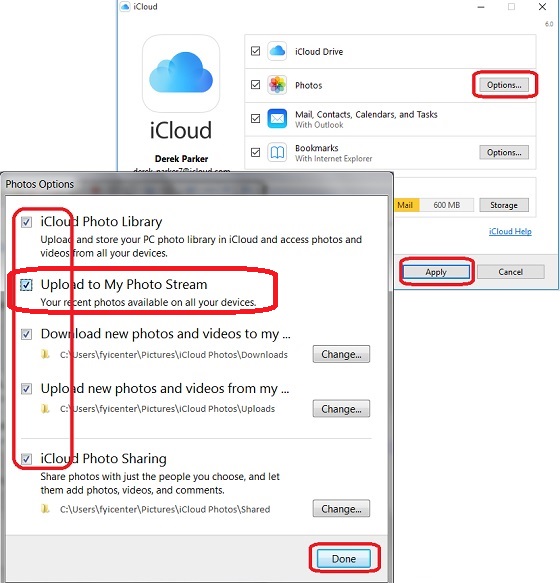
1. Turn on "Upload to My Photo Stream" in iCloud for Windows - Run "iCloud" from the program search box; Click "Options" next to "Photos"; Check "Upload to My Photo Stream"; Click "Done" and "Apply".
2. Send photos from iPhone to "My Photo Stream" - Take some new photos with your iPhone that has "My Photo Stream" turned on and connected to Wi-Fi. Those photos will be uploaded to My Photo Stream in iCloud, then pushed to the "Downloads" folder on your PC automatically.
3. Send photos from PC to "My Photo Stream" - Copy and paste some photos from your PC to the "Uploads" folder. Those photos will be uploaded to My Photo Stream in iCloud, then pushed to your iPhone automatically.
The picture below shows you how to turn on "My Photo Stream" in iCloud for Windows:
2017-07-25, ∼4574🔥, 0💬
Related Topics:
