Change Photos Options in iCloud for Windows
How to change photos options in iCloud for Windows? I want to turn on iCloud Photo Library and My Photo Stream on my Windows PC.
✍: FYIcenter.com
 If you have iCloud for Windows installed and running on your Windows PC,
you can view and change iCloud for Windows options to
as described below:
If you have iCloud for Windows installed and running on your Windows PC,
you can view and change iCloud for Windows options to
as described below:
1. Type in "iCloud" in the program search box.
2. Select "iCloud" in the matched program list.
3. Login with your Apple ID and password, if you are not logged in yet. You see your iCloud for Windows setup screen.
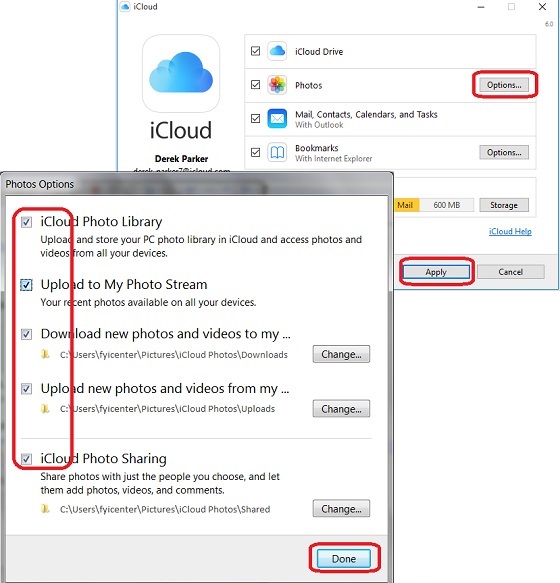
4. Click "Options" next to "Photos" You see the Photos Options screen with the following switches and settings:
[x] iCloud Photo Library
    Upload and store your PC photo library in iCloud and access photos
  and videos from all your devices.

[x] Upload to My Photo Stream
    Your recent photos available on all your devices.

[x] Download new photos and videos to my ...
    C:\Users\fyicenter\Pictures\iCloud Photos\Downloads

[x] Upload new photos and videos from my ...
    C:\Users\fyicenter\Pictures\iCloud Photos\Uploads

[x] iCloud Photo Sharing
    Share photos with just the people you choose, and let them add
  photos, videos, and comments.
  C:\Users\fyicenter\Pictures\iCloud Photos\Shared
5. Check all options to turn them on. And click "Done"
6. Click "Apply" on the iCloud for Windows setup screen.
The picture below shows you how to change photo options in iCloud for Windows:
⇒ Access iCloud Photos with Windows Explorer
2017-08-08, ∼6013🔥, 0💬
Related Topics:
