Download Photos with iCloud for Windows
How to download photos and videos from iCloud Photo Library with iCloud for Windows?
✍: FYIcenter.com
 If you have iCloud for Windows installed and running on your Windows PC,
you can download photos and videos from iCloud Photo Library
as described below:
If you have iCloud for Windows installed and running on your Windows PC,
you can download photos and videos from iCloud Photo Library
as described below:
1. Open Windows Explorer.
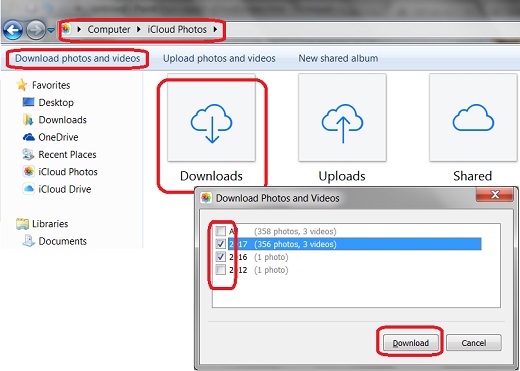
2. Enter "Computer\iCloud Photos" in the folder address box. You see 3 sub folders listed: Downloads, Uploads and Shared.
3. Click "Upload photos and videos" in the menu area. You see a selection screen displayed with photos and videos in iCloud Photo Library divided in years.
4. Choose the photos and videos you want to download, like "2017 (356 photos, 3 videos)".
5. Click "Download" to download selected photos and videos. Downloaded items will be stored in the "Downloads" folder.
The picture below shows you how to download photos and videos from iCloud Photo Library with iCloud for Windows:
You also use the "Download Photos" function from the iCloud system tray up download photos and videos from iCloud Photo Library.
⇒ My Photo Stream with iCloud for Windows
2017-07-25, ∼3415🔥, 0💬
Related Topics:
