Upload Photos with iCloud for Windows
How to upload photos and videos to iCloud Photo Library with iCloud for Windows?
✍: FYIcenter.com
 If you have iCloud for Windows installed and running on your Windows PC,
you can upload photos and videos to iCloud Photo Library
as described below:
If you have iCloud for Windows installed and running on your Windows PC,
you can upload photos and videos to iCloud Photo Library
as described below:
1. Open Windows Explorer.
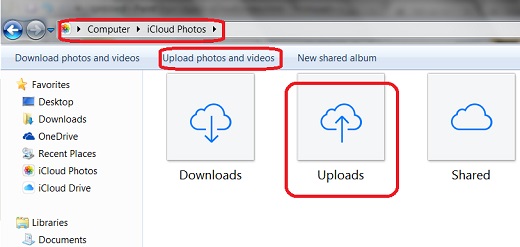
2. Enter "Computer\iCloud Photos" in the folder address box. You see 3 sub folders listed: Downloads, Uploads and Shared.
3. Copy and paste any photo and video files into the "Uploads" folder from your PC. Those photos and videos will be uploaded to iCloud Photo Library
4. Or click "Upload photos and videos" in the menu area. And select the photos and videos you want to upload, then click "Open" to upload selected photos and videos.
The picture below shows you how to upload photos and videos to iCloud Photo Library with iCloud for Windows:
You also use the "Upload Photos" function from the iCloud system tray up upload photos and videos to iCloud Photo Library.
⇒ Download Photos with iCloud for Windows
2017-08-08, ∼2925🔥, 0💬
Related Topics:
