Missing iCloud Photo Library Function on iPhone
Where is the iCloud Photo Library function on my iPhone? I don't see it on the "Settings > iCloud > Photos" screen.
✍: FYIcenter.com
 If your iPhone has Wi-Fi turned off or not connected to any Wi-Fi services,
the iCloud Photo Library function will not be displayed on the
"Settings > iCloud > Photos" screen.
See the picture below:
If your iPhone has Wi-Fi turned off or not connected to any Wi-Fi services,
the iCloud Photo Library function will not be displayed on the
"Settings > iCloud > Photos" screen.
See the picture below:
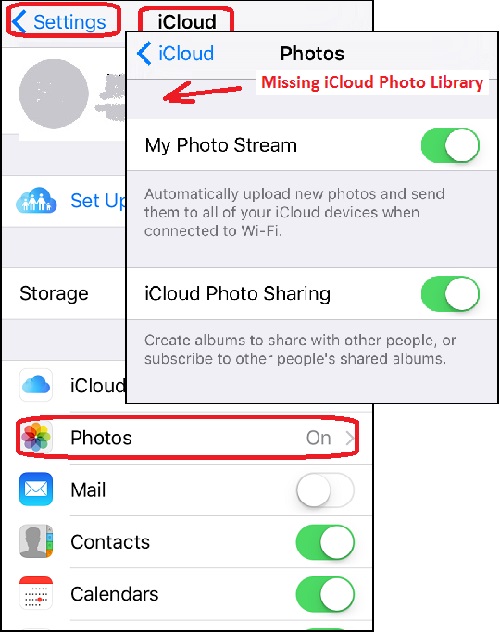
Apple is hiding the iCloud Photo Library function on your iPhone, to prevent you using cellular data connection for photo transfers to avoid large cellphone bills.
You can connect your iPhone to a Wi-Fi, the iCloud Photo Library function will show up on the "Settings > iCloud > Photos" screen.
⇒ Sharing iPhone Photos in My Photo Stream
⇐ Optimize Storage of iPhone Photos Synchronized with iCloud
2017-06-28, ∼2659🔥, 0💬
Related Topics:
