Optimize Storage of iPhone Photos Synchronized with iCloud
How to free up storage of iPhone Photos synchronized with iCloud? My iPhone is running out of storage space and I don't want to delete any photos.
✍: FYIcenter.com
 If your iPhone photos are synchronized with iCloud Photo Library,
you should not delete any photos to free up storage.
If your iPhone photos are synchronized with iCloud Photo Library,
you should not delete any photos to free up storage.
When you are running out of storage on your iPhone, you can free up storage by using the "Optimize iPhone Storage" option as described below.
1. Connect your iPhone to Internet with Wi-Fi.
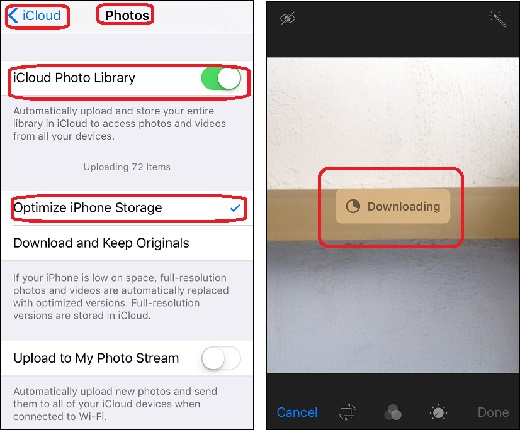
2. Tap on "Settings > iCloud > Photos". You see iCloud photos options.
3. Tap on "Optimize iPhone Storage" to select this option.
4. Wait for your iPhone to reduce resolutions of older photos and videos on your iPhone to free up more storage. Original versions of the same photos and videos are safely stored in iCloud Photo Library.
The advantage of using "Optimize iPhone Storage" is that your photos are consuming must less storage space now. The downside of this is whenever you want to use a photo with a reduced resolution, iPhone will download the original version from iCloud Photo Library.
For example, open Photos app, and try to edit an older photo. You see a "Downloading" message displayed in the middle of the photo. You have to wait until the download to finish before you can continue to edit.
The picture below shows you the "Optimize iPhone Storage"
to reduce storage consumption of photos synchronized with iCloud Photo Library and
the download behavior when editing a photo that has reduced resolution:
⇒ Missing iCloud Photo Library Function on iPhone
⇐ Don't Delete Photos Synchronized between iPhone and iCloud
2017-06-28, ∼4720🔥, 0💬
Related Topics:
