Sharing iPhone Photos in My Photo Stream
How to share iPhone photos in My Photo Stream?
✍: FYIcenter.com
 My Photo Stream is an iCloud service that allows you to share photos among all
your devices: iPhone, iPad, iPod touch, Mac, Apple TV or PC.
My Photo Stream is an iCloud service that allows you to share photos among all
your devices: iPhone, iPad, iPod touch, Mac, Apple TV or PC.
You can share your iPhone photos in My Photo Stream automatically as described below:
1. Connect your iPhone to Internet with Wi-Fi.
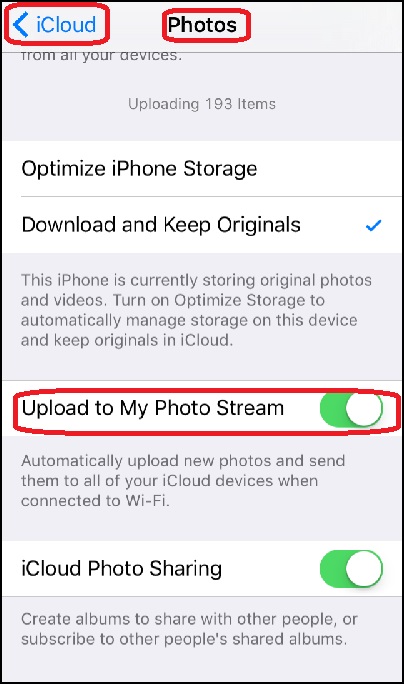
2. Tap on "Settings > iCloud > Photos". You see iCloud photos options.
3. Tap on "My Photo Stream" to select this option. iPhone will automatically upload new photos and send them to all your iCloud devices when connected to Wi-Fi.
4. Take some new photos with your iPhone. Copies of those photos will be uploaded "My Photo Stream" sent to other devices connected to your iCloud account.
5. Wait some time, and go to your iPad or Mac. You see those new photos showing up in the "My Photo Stream" album.
The picture below shows you how to Sharing iPhone Photos in My Photo Stream:
⇒ Storage Size of My Photo Stream in iCloud
⇐ Missing iCloud Photo Library Function on iPhone
2017-06-28, ∼2660🔥, 0💬
Related Topics:

