Taking Vertical Panorama Photos with iPhone
How to take a vertical panorama photo with my iPhone camera? I am in New York city and want to a panorama photo a high-rise building.
✍: FYIcenter.com
 If you want a vertical panorama photo of a high-rise subject,
you can use the pano mode of your iPhone camera as described below:
If you want a vertical panorama photo of a high-rise subject,
you can use the pano mode of your iPhone camera as described below:
1. Open your iPhone camera and turn it 90 degrees counter clockwise.
2. Swipe the camera mode selections above the shutter icon and select "PANO". You see a PANO mode indication displayed in the middle of the screen.
3. Focus the camera at the bottom of the building. Press the center of the screen until the AE/AF Lock indicator shows up.
4. Press the shutter icon. The camera starts to record view.
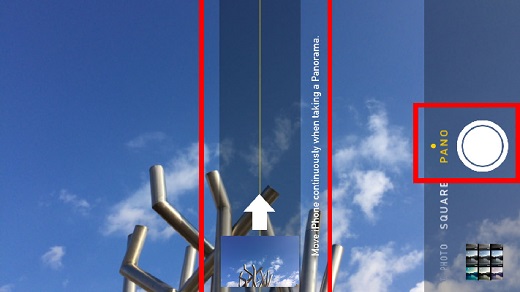
5. Slowly rotate your iPhone vertically up as shown by the arrow displayed on the screen. Do not rotate it horizontally. And do not rotate it downward.
6. Press the shutter icon again to stop recording when you reaches the top of the building.
7. Your vertical panorama photo will be created automatically.
The picture below shows you how to take vertical panorama photos with your iPhone (source: 24mactips.com):
⇒ Taking Video with iPhone Camera
2017-06-23, ∼3358🔥, 0💬
Related Topics:


