Dark Apps in Waiting after Transferring from old iPhone
Why apps are displayed in dark and in status of "Waiting" after after transferring them from my old iPhone?
✍: FYIcenter.com
 After you have transferred your apps and data from your old iPhone
using the the "Restore from iCloud/iTunes Backup" function,
some apps will be displayed in dark and labeled as "Waiting".
After you have transferred your apps and data from your old iPhone
using the the "Restore from iCloud/iTunes Backup" function,
some apps will be displayed in dark and labeled as "Waiting".
This is because your new iPhone is using a newer version of iOS and some apps from your old iPhone are outdated. You need to download and install them again from Apple App Store as described below:
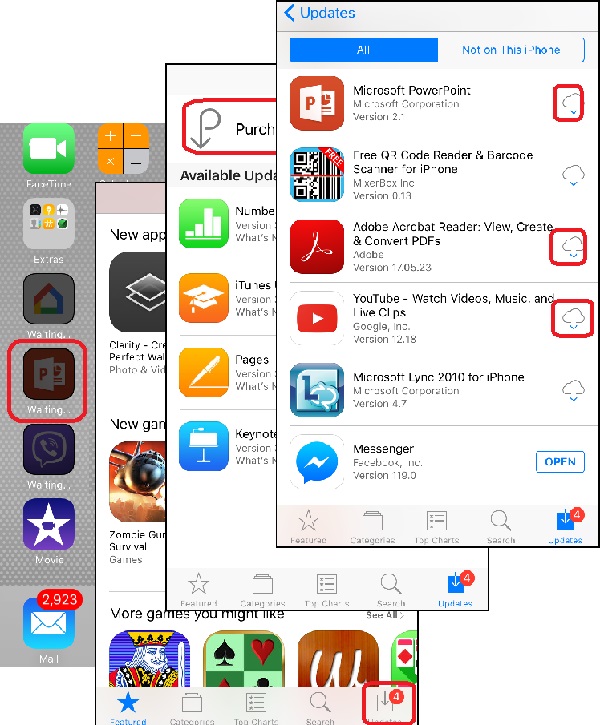
1. Connect to your new iPhone with Wi-Fi. And tap on "App Store". You see "App Store" screen.
2. Tap on "Updates" near the bottom right corner of the screen.
3. Tap on "Purchased". You see a list of apps that you have used on your old iPhone.
4. Tap on the download icon next to the App, for example Microsoft PowerPoint.
5. Continue to tap on the download icon for other apps.
6. Wait until all apps are downloaded.
Now your apps should be ready on your new iPhone.
The picture below shows you how to download and install apps that are dark and labeled as "Waiting":
⇒ iOS - System Software for iPhone
2022-02-24, ≈19🔥, 3💬
Related Topics:

💬 2021-10-10 FYIcenter.com: @Tim, What is the iOS version of your iPhone?
💬 2021-10-05 Tim: I can’t find updates in corner of App Store page

