iPhone Camera Video Recording Resolutions
Where to change video recording resolution on my iPhone camera? My iPhone have a large storage and I want to use the highest screen resolution.
✍: FYIcenter.com
 You iPhone camera supports multiple video recording resolutions.
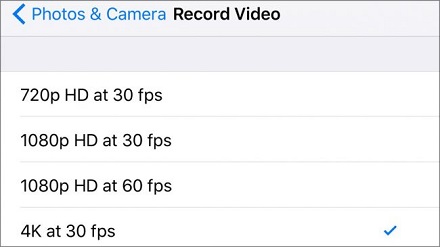
For example, iPhone 6 supports 4 video recording resolutions:
You iPhone camera supports multiple video recording resolutions.
For example, iPhone 6 supports 4 video recording resolutions:
- 720p HD at 30 fps - High Definition screen resolution: Each frame is 720 pixels wide and 30 frames per second, using about 60 MB storage per minute.
- 1080 HD at 30 fps - Full High Definition screen resolution: Each frame is 1080 pixels wide and 30 frames per second, using about 120 MB storage per minute.
- 1080 HD at 60 fps - Full High Definition screen resolution and smoother video: Each frame is 1080 pixels wide and 60 frames per second, using about 200 MB storage per minute.
- 4K at 30 fps - Ultra High Definition screen resolution: Each frame is 4096 pixels wide and 30 frames per second, using about 375 MB storage per minute.
Note that 30 fps will give you a good motion quality in most situations. But to record objects at a high moving speed, you should use 60 fps. As a reference, most movies are recorded at 24 fps.
You can follow these steps to change video recording resolution of you iPhone camera:
1. Tap on "Settings > Photos & Camera". You see the "Photos & Camera" screen.
2. Tap on "Record Video" near the bottom. You see the "Record Video" screen.
3. Tap on "4K at 30 fps" to make it checked.
Now, your iPhone camera will record video with the highest screen resolution.
The picture below shows you locations of iPhone cameras:
⇒ Taking Time-Lapse Video with iPhone
⇐ Taking Video with iPhone Camera
2017-10-08, ∼3603🔥, 0💬

