Upload Photos to iCloud from iPhone
How to upload photos to iCloud from my iPhone? I want to save a copy of my photos in the iCloud.
✍: FYIcenter.com
 If you want upload your photos to iCloud from your iPhone,
you can follow these steps:
If you want upload your photos to iCloud from your iPhone,
you can follow these steps:
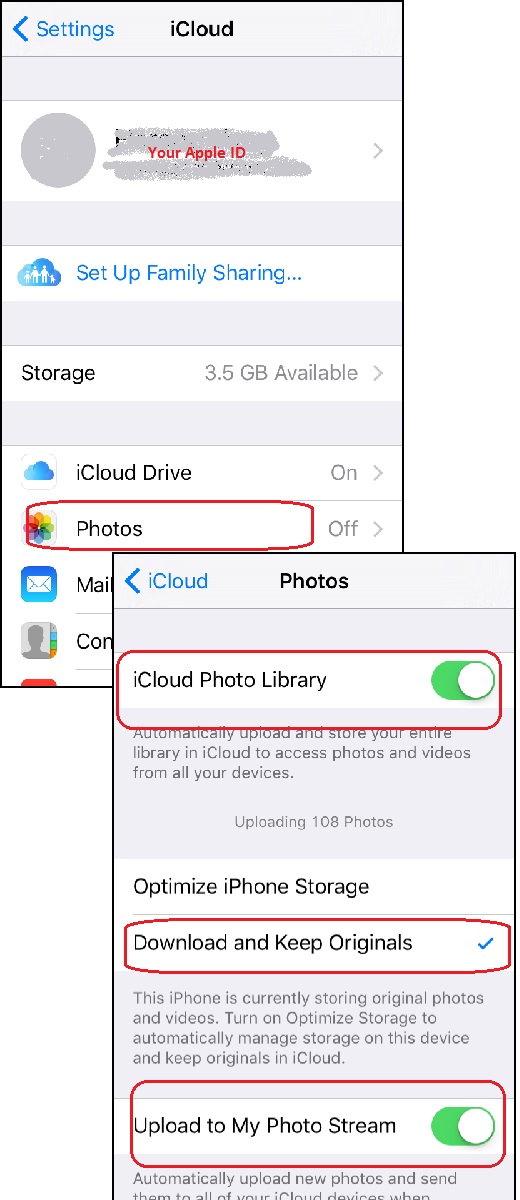
1. Go to "Settings > iCloud". You see a list of iCloud functions.
2. Tap on "iCloud Drive". You see the iCloud Drive settings.
3. Tap on the "Photos" switch to turn it on. Apple may ask you to enter Apple ID to double check your identity.
4. After photos function is turned on, you see the photos screen.
5. Tap on "iCloud Photo Library" switch to turn it on. It automatically upload and store your entire library in iCloud to access photos and videos from all your devices.
6. Tap on "Download and Keep Originals" to select this option. It keeps the original photos and videos on your iPhone.
7. Tap on "Upload to My Photo Stream" switch to turn it on. It automatically upload new photos and send them to all of your iCloud devices when connected to Wi-Fi.
The picture below shows you how to manage iCloud storage from your iPhone:
⇒ Setup iCloud mail Box from iPhone
2017-11-11, ∼3063🔥, 0💬
Related Topics:
