Using iCloud Drive on iPhone
How to use iCloud Drive on my iPhone? My iPhone is connected to iCloud.
✍: FYIcenter.com
 Some apps on your iPhone can save documents or data directly
to you iCloud drive storage.
If you want to allows this to happen,
you can follow these steps:
Some apps on your iPhone can save documents or data directly
to you iCloud drive storage.
If you want to allows this to happen,
you can follow these steps:
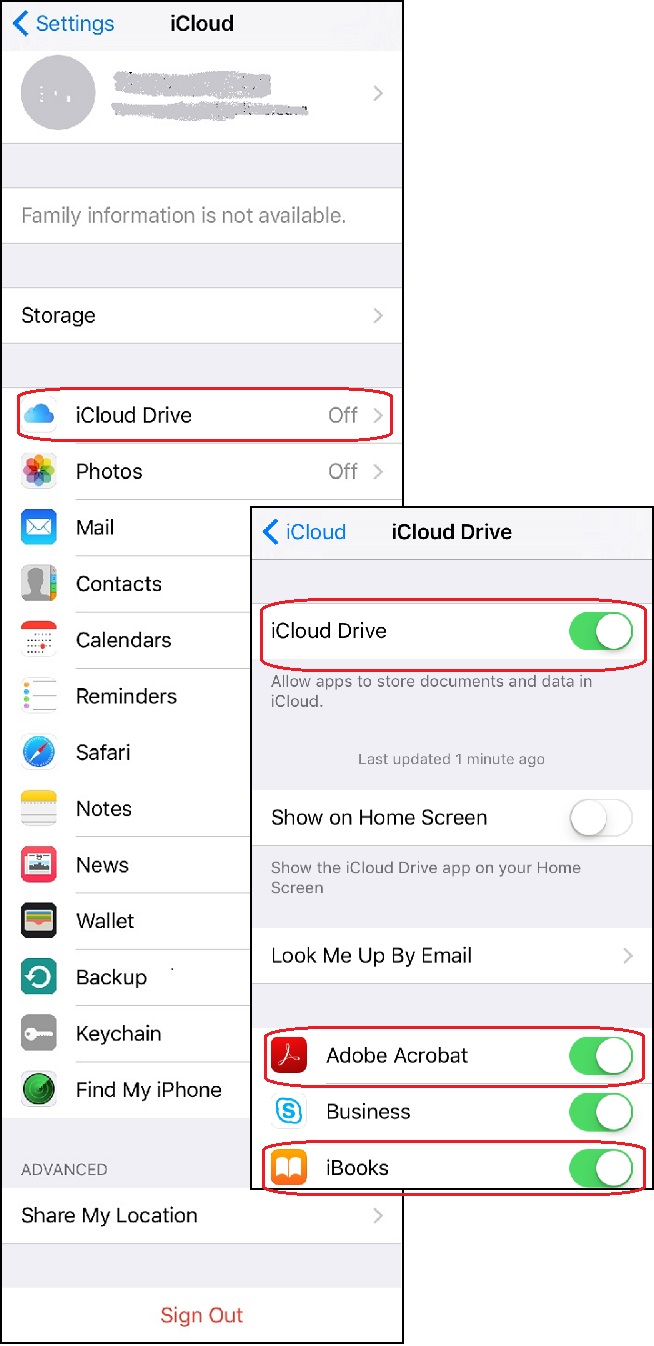
1. Go to "Settings > iCloud". You see a list of iCloud functions.
2. Tap on "iCloud Drive". You see the iCloud Drive settings.
3. Tap on the "iCloud Drive" switch to turn it on. Apple may ask you to enter Apple ID to double check your identity.
4. Tap on the "Show on Home Screen" switch to to display iCloud Drive on the home screen of your iPhone.
5. Tap on the "Adobe Acrobat" switch to allow Adobe Acrobat to store documents and data to iCloud drive directly.
6. Tap on the "iBook" switch to allow iBook to store documents and data to iCloud drive directly.
7. Continue to give permissions to other apps.
The picture below shows you how to turn on iCloud Drive on your iPhone:
⇒ Upload Photos to iCloud from iPhone
2017-10-16, ∼3437🔥, 0💬
Related Topics:
