Add a Friend in Contact List on iCloud.com
How to add the number of a new friend in the contact list on my iCloud.com? I can not find the add button.
✍: FYIcenter.com
 There is not add button in "Contacts" on iCloud.com.
You can add a new friend to your contact list
by following these steps:
There is not add button in "Contacts" on iCloud.com.
You can add a new friend to your contact list
by following these steps:
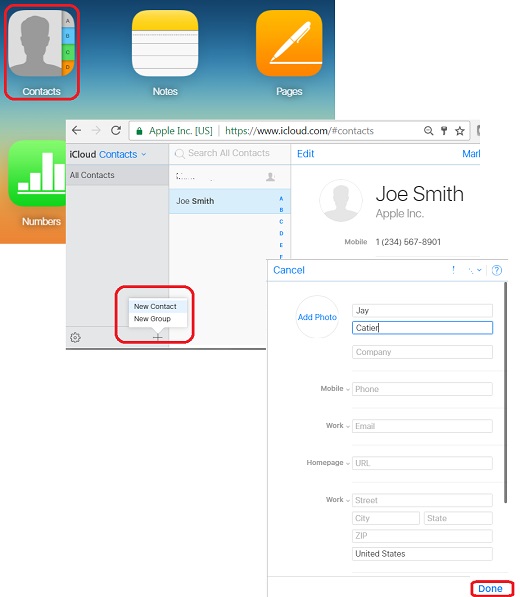
1. Login to https://www.icloud.com with a Web browser. You see iCloud home page showing up.
2. Click the "Contacts" box. You see a list of contacts that you have created in your iCloud before.
3. Click on the one plus sign (+) on the bottom left corner. Add select "New Contact". You see an empty contact form showing up.
4. Enter your friend's name and phone. Then click "Done".
Your new friend is added to your contact list now.
The picture below shows you how to add a new friend the contact on iCloud.com with a Web browser:
2017-09-28, ∼9266🔥, 0💬
Related Topics: