Transfer PDF File to iPhone/iPad
How to transfer PDF files to iPhone/iPad? I have some PDF files in my iTunes library, and I want to read them on my iPhone.
✍: FYIcenter.com
If you have PDF files in your iTunes library, you can follow these steps to transfer PDF files to your iPhone/iPad:
1. Run iTunes on the computer.
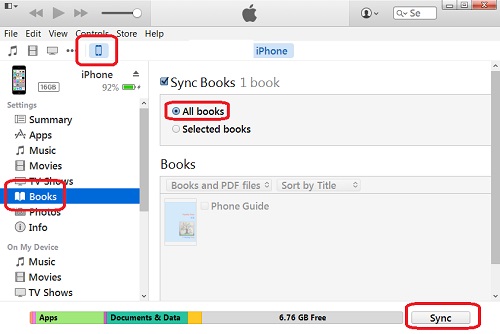
2. Connect your iPhone to the computer with USB cable. You will see your iPhone showing up as an icon in the menu area.
3. Click on the iPhone icon. You will a summary of your iPhone as a device.
4. Click on "Books" in the list of "Settings". You will see the "Sync Books" screen with PDF files from the iTunes library listed
5. Check the "All books" sync option
and click the "Sync" button near the bottom right corner.
iTunes will transfer all PDF books to iPhone.
2016-02-29, ∼3378🔥, 0💬
Related Topics: