Categories:
Android (32)
Apple (iPhone) (829)
Apps (26)
BlackBerry (3)
General (438)
HTC (6)
Huawei (83)
LG (43)
Motorola (50)
Nokia (4)
Palm (10)
Samsung (139)
Sony (1)
Technology (17)
Windows Phone (209)
ZTE (5)
Online Tools:
Tutorial Collections:
Other Resources:
What Is AirDrop on iPhone
What is AirDrop? How to turn AirDrop on or off on my iPhone?
✍: FYIcenter.com
AirDrop is wireless communication tool that allows you to transfer files between iPhone and other Apple devices.
When AirDrop is turned on, it uses Bluetooth to detect other nearby iPhone or Apple devices that supports AirDrop. Once detected, it will establish a secure peer-to-peer wireless network with the other device.
Then you can transfer almost any files between your iPhone and the other device using the share icon.
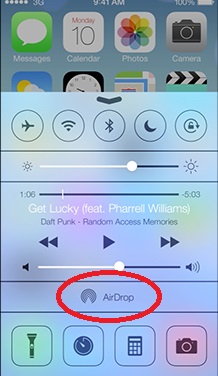
To turn on or off AirDrop, you need to slid up the bottom edge of the screen to display the control panel.
The picture below shows you the AirDrop setting on the iPhone Control Panel:
2016-02-24, ∼2724🔥, 0💬
Popular Posts:
Where to find answers to frequently asked questions on phone numbers? Here is a list of frequently a...
How to apply for Apple ID with Web browser? I need an Apple ID to use iCloud to backup my photos. If...
When was HTC Windows Phone 8X first released? How does HTC Windows Phone 8X look like? What are the ...
What are the OS (Operating Systems) used on mobile phones? Which one is more popular? Currently, the...