Adding PDF File to iTunes Library
How to add PDF files to iTunes library? There are no books in my iTunes library.
✍: FYIcenter.com

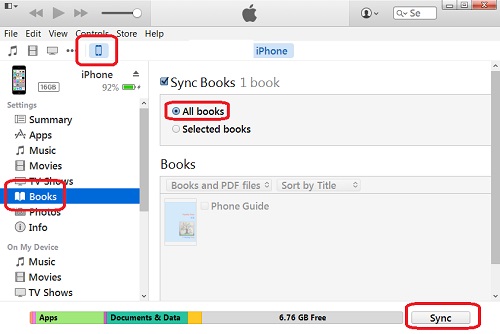
If you are running iTunes on Windows, you can follow these steps to add PDF files to your iTunes library:
1. Run iTunes and click the "Book" icon in the menu. If the "Book" is not listed, click "..." and select "Books". You will see "My Books", "My PDFs" and other tabs.
2. Click "My PDFs" tab. You may see no PDF files listed on the screen.
3. Open Windows Explorer and locate the PDF file you want to add.
4. Drag and drop the PDF file to iTunes window. You will see the first page of the PDF file listed under "MyPDFs".
5. Repeat Step 2 and 3 to add more PDF files.
You can also use the "File > Add to Library" menu command to add a PDF file to the iTunes library.
2016-02-26, ∼5620🔥, 0💬
Related Topics: