Categories:
Android (32)
Apple (iPhone) (829)
Apps (26)
BlackBerry (3)
General (438)
HTC (6)
Huawei (83)
LG (43)
Motorola (50)
Nokia (4)
Palm (10)
Samsung (139)
Sony (1)
Technology (17)
Windows Phone (209)
ZTE (5)
Online Tools:
Tutorial Collections:
Other Resources:
Syncing iPhone Data with iTunes
How to sync my iPhone with my iTunes on my Windows computer? I some new music on my iPhone and I want to listen on my iTunes.
✍: FYIcenter.com
Syncing your iPhone with iTunes is really easy:
1. Connect your iPhone with your computer with the USB cable.
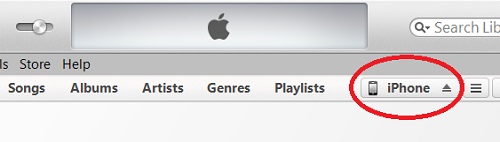
2. Run iTunes from your computer and click on the "iPhone" tab.
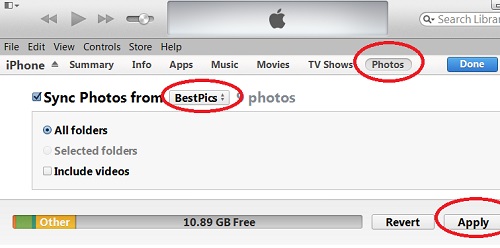
3. Click "File > Devices > Sync iPhone" menu or click the "Sync" button at the end of the status bar.
iTunes will exchange data including pictures, music, and videos between your iPhone and iTunes to keep them in sync.
2014-04-29, ∼3053🔥, 0💬
Popular Posts:
What does IMSI stand for? And what does the IMSI number mean on my phone? IMSI stands for Internatio...
Where are cameras located on my iPhone? iPhone comes with 2 cameras: rear camera and front camera. L...
How to manage trusted devices for Apple ID with a Web browser on my computer? I want to remove my ol...
How to get see the IMEI and ICCID info on my Apple new iPhone? I only see the "Hello" screen. If you...
How find the model number of my LG phone? To find the model number of your LG phone, you can: Look a...