Connect to Bluetooth Earphone from iPhone
How to connect to my Bluetooth earphone from my iPhone? I have the JLab Epic Earbud set.
✍: FYIcenter.com
 Here are the correct steps to connect to your Bluetooth earphone from your iPhone.
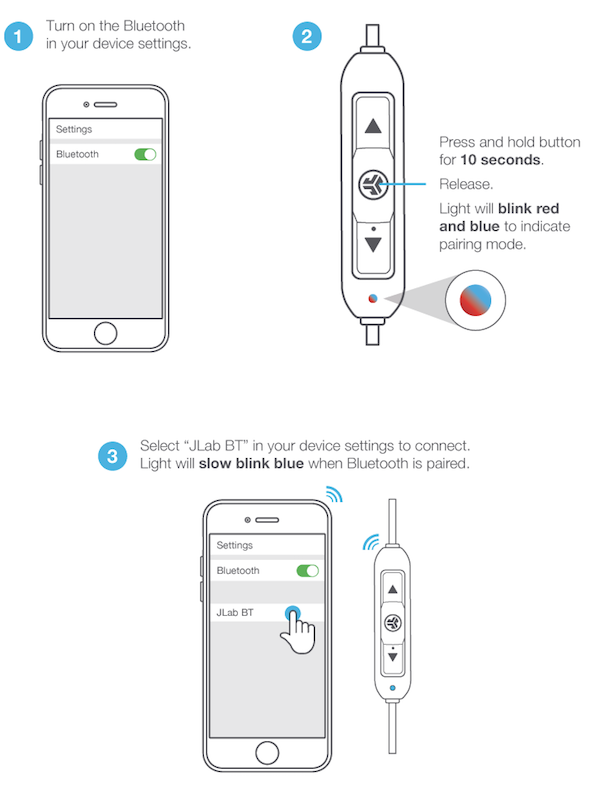
1. Make sure your Bluetooth earphone is charged and turned on for pairing. For your JLab Epic Earbud set, you need to:
- Fully charge the earbud set.
- Put on the earbud set - both earpieces into your ears.
- Press the power button to turn on the earbud set.
- Press the JLab logo button for 10 seconds. You will hear a voice message: "Your phone is ready to pair". You also see a blinking red and blue light to indicate ready for paring.
2. On your iPhone, turn on Bluetooth: "Settings > Bluetooth > On". You should see your your JLab Epic earbud listed as "JLab Epic".
3. Tab on "JLab Epic". You see "JLab Epic" become connected. No pairing code needed. If a pairing code is needed. It will be provided by in vender's instructions.
Once connected, you can use your Bluetooth to make phone calls, listen to music, or recording audio messages.
The picture below shows you the error when browsing files on your iPhone over Bluetooth connection from your macOS computer:
⇒ Verify Bluetooth Earphone Connection on iPhone
2020-03-14, ∼2937🔥, 0💬
Related Topics:

