Bluetooth Connection - iPhone to macOS
How to create a Bluetooth connection from my iPhone to my macOS?
✍: FYIcenter.com
 Here are the correct steps to create a Bluetooth connection from your iPhone to your macOS.
1. On your macOS, turn on Bluetooth: "Settings > Bluetooth > On". And set your macOS as discoverable.
2. On your iPhone, go to "Settings > Bluetooth". And turn on "Bluetooth". You should see your macOS being discovered and displayed like: FYI's MacBook Pro. It may take few seconds to discover it.
3. Tap on your macOS name, FYI's MacBook Pro. This sends a pairing request to your macOS.
4. On your macOS, you see a message box:
Pairing Request from: My iPhone
  To pair with the device, click Pair to complete the pairing process.
  To reject pairing with the device, click Cancel.
5. Click "Pair". This sends a pairing accepted response back to your iPhone.
6. On your iPhone. You see your macOS, FYI's MacBook Pro, become connected. Enjoy the Bluetooth connection!
Once connected, apps on your iPhone or macOS can use this connection to perform special functions, like play music from each others music library, or transfer files.
The picture below shows you how to create a Bluetooth connection from your iPhone to your macOS:
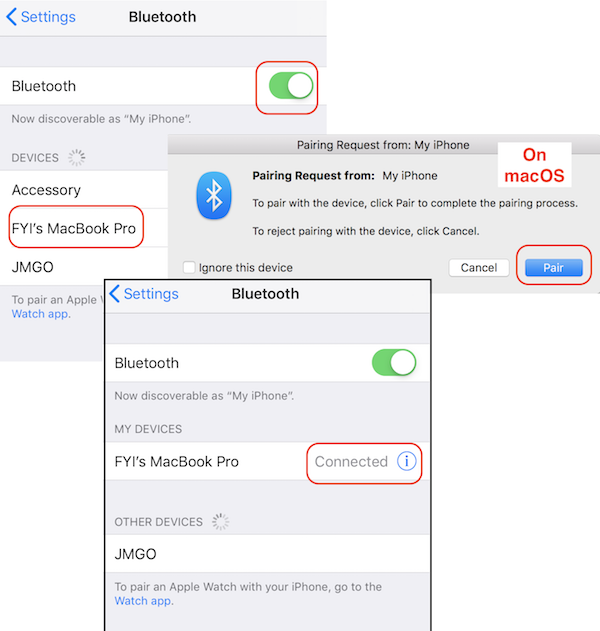
Once your iPhone and macOS are paired with Bluetooth, you just need to tap on the device name to reconnect them.
⇒ Disconnect Bluetooth Device from iPhone
2020-03-15, ∼2544🔥, 0💬
Related Topics:

