Disconnect Bluetooth Device from iPhone
How to disconnect and remove a Bluetooth device from my iPhone? I don't want to keep the connection with this device any more.
✍: FYIcenter.com
 Once a Bluetooth is connected to your iPhone,
it will be remembered in your iPhone and always listed under "MY DEVICES"
in "Settings > Bluetooth".
Once a Bluetooth is connected to your iPhone,
it will be remembered in your iPhone and always listed under "MY DEVICES"
in "Settings > Bluetooth".
Here are the correct steps to disconnect and remove a Bluetooth device from your iPhone.
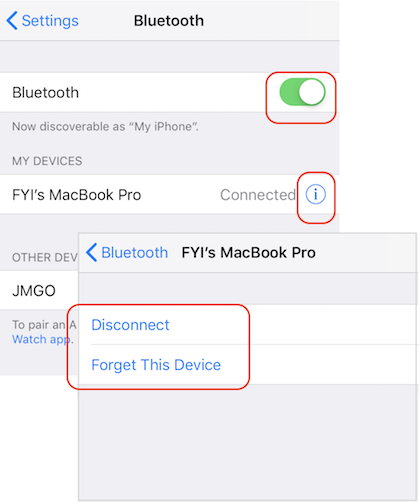
1. Turn on Bluetooth: "Settings > Bluetooth > On". You see the Bluetooth device, FYI's MacBook Pro, listed under "MY DEVICES".
2. Tap on the "info" sign next to "FYI's MacBook Pro". You see one or two options:
Disconnect (If currently connected)
Forget This Device
3. Tap on "Disconnect", if you just want disconnect the current connection and keep "FYI's MacBook Pro" device as paired and not connected.
4. Tap on "Forget This Device", if you want remove "FYI's MacBook Pro" device information from your iPhone. If you want connect to it again in the furture, you need to pair it again.
The picture below shows you how to create a Bluetooth connection from your iPhone to your macOS:
Once your iPhone and macOS are paired with Bluetooth, you just need to tap on the device name to reconnect them.
⇒ Bluetooth Connection - macOS to iPhone
2020-03-15, ∼2861🔥, 0💬
Related Topics:

