Connect to Hidden Wi-Fi Networks on iPhone
How to connect to hidden Wi-Fi networks on my iPhone? My friend's Wi-Fi network name is hidden and invisible to other devices.
✍: FYIcenter.com
 Here are the correct steps to connect to a hidden Wi-Fi network on your iPhone.
Your friend sets his Wi-Fi network to be hidden and invisible
to be more secure, since other people can not see it.
Here are the correct steps to connect to a hidden Wi-Fi network on your iPhone.
Your friend sets his Wi-Fi network to be hidden and invisible
to be more secure, since other people can not see it.
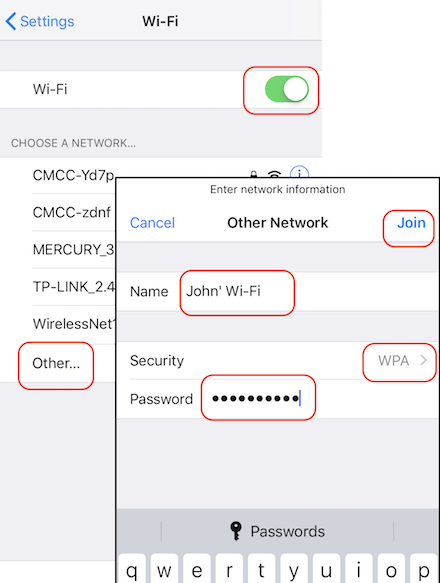
1. Ask your friend to give you his Wi-Fi network name, security type like WPA, and access password.
2. Go to "Settings > Wi-Fi". You see Wi-Fi settings.
2. Turn the "Wi-Fi" switch on. You should not see your friend's Wi-Fi network name listed, because it is hidden and invisible.
3. Tap on "Other..." at the end of the list. You see an empty form.
4. Enter the Wi-Fi network name like "John's Wi-Fi" given to by your friend.
5. Select the correct security type like "WPA" given to by your friend.
6. Enter the password given to by your friend.
5. Tap on "Join". In a few seconds, your iPhone will be connected to your friend's Wi-Fi network. Enjoy the free Wi-Fi service!
The picture below shows you how to turn on and off Wi-Fi on your iPhone:
⇒ View Wi-Fi Connection Details on iPhone
2020-04-25, ∼2646🔥, 0💬
Related Topics:


