Connect to Wi-Fi Networks on iPhone
How to connect to Wi-Fi networks on my iPhone? I am at my friend's place and I want to use his Wi-Fi network.
✍: FYIcenter.com
 Here are the correct steps to connect to a Wi-Fi network on your iPhone.
1. Ask your friend to give you his Wi-Fi network name and access password.
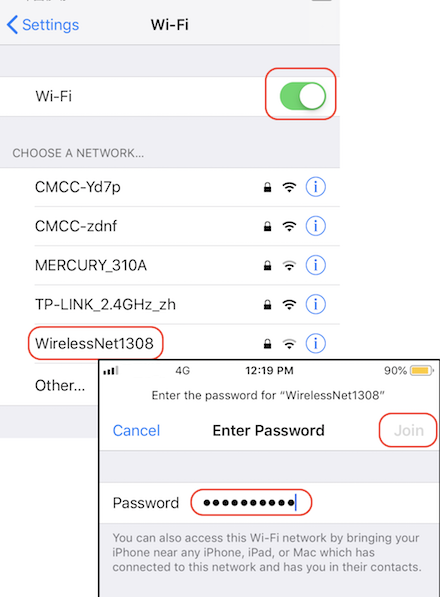
2. Go to "Settings > Wi-Fi". You see Wi-Fi settings.
2. Turn the "Wi-Fi" switch on. You should see your friend's Wi-Fi network name listed.
3. Tap on that Wi-Fi network name. You see the password screen.
4. Enter the password given to by your friend.
5. Tap on "Join". In a few seconds, your iPhone will be connected to your friend's Wi-Fi network. Enjoy the free Wi-Fi service!
You can use these same steps to join other Wi-Fi networks in public places like restaurants. If such a Wi-Fi network requires a password, you need to ask from the password from the owner.
The picture below shows you how to ect to a Wi-Fi network on your iPhone:
2020-04-25, ∼2391🔥, 0💬
Related Topics:


