Turn On/Off Wi-Fi on iPhone
Q
How to turn on and off Wi-Fi function on my iPhone?
✍: FYIcenter.com
A
 Here are the correct steps to turn on Wi-Fi function on your iPhone.
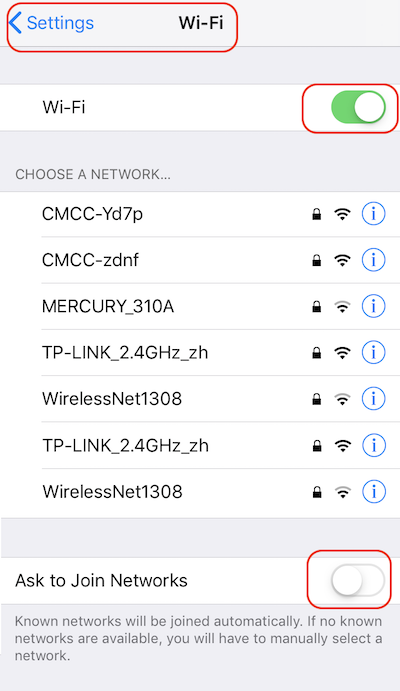
1. Go to "Settings > Wi-Fi". You see Wi-Fi settings.
2. Turn the "Wi-Fi" switch on. You see a list of nearby Wi-Fi service points, also called Wi-Fi networks.
3. Turn "Ask to Join Networks" switch off at the bottom. This will stop new Wi-Fi service points showing up on your screen automatically, which is an annoying behavior.
The Wi-Fi function is turned on now.
If you want to stop using the Wi-Fi function, turn the "Wi-Fi" switch off.
The picture below shows you how to turn on and off Wi-Fi on your iPhone:
2020-04-25, ∼2426🔥, 0💬
Related Topics:

