View iTunes Local Book Library
How to view iTunes local book library on Windows?
✍: FYIcenter.com
 Like music files, iTunes also maintains a local book library on Windows.
You can follow this tutorial to view iTunes local book library.
Like music files, iTunes also maintains a local book library on Windows.
You can follow this tutorial to view iTunes local book library.
1. Run iTunes on your Windows computer.
2. Connect your iPhone to the computer with a USB cable. You see a phone icon showing up.
3. Click on the phone icon. You see the phone device management windows.
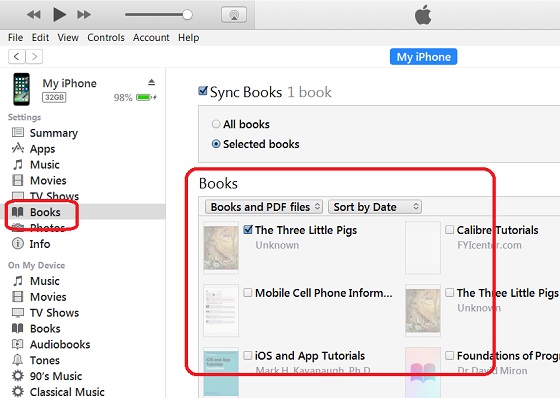
4. Click on "Books" under "Settings" on the left. You see a list of books in iTunes local library.
The picture below shows you how to view iTunes local book library:
⇒ Add Books to iTunes Local Library
⇐ View iBooks Library from iTunes
2018-04-28, ∼3492🔥, 0💬
Related Topics:

💬 2025-08-11 John Gotti: Can anyone please assist me with location unlock code
