Cache Books in iTunes Media Folder
How to cache books in iTunes media folder?
✍: FYIcenter.com
 To void sync error with missing book files,
you can cache books in iTunes media folder as shown in this tutorial.
To void sync error with missing book files,
you can cache books in iTunes media folder as shown in this tutorial.
1. Run iTunes and connect your iPhone to the computer with a USB cable. You see a phone icon showing up.
2. Click on the phone icon. You see the phone device management windows.
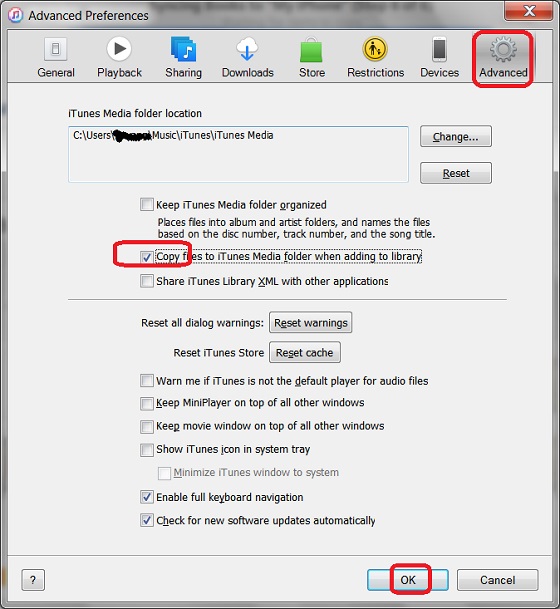
3. Click "Edit > Preferences" menu. You see the preference settings screen.
4. Click "Advanced". You see the iTunes Media folder location: "C:\Users\fyicenter\Music\iTunes\iTunes Media".
5. Click "Copy files to iTunes Media folder when adding to library" to turn it on.
6. Click "OK" to save changes.
From now on, you should have any sync error, because copies of all books added to iTunes are also saved in iTunes Media folder.
The picture below shows you how to cache books in iTunes media folder:
⇒ Apple iBooks - Frequently Asked Questions
⇐ iTunes Sync Error: Book not Found
2018-04-28, ∼3960🔥, 0💬
Related Topics:

💬 2025-08-11 John Gotti: Can anyone please assist me with location unlock code