Update Android System on LG Phone
How to Update Android System on my LG Phone? I saw the "Android System Update" alert in the status bar menu.
✍: FYIcenter.com
 If you see the "Android System Update" alert in the status bar menu,
your LG phone has downloaded an update for the Android system
which is the operating system of your phone.
If you see the "Android System Update" alert in the status bar menu,
your LG phone has downloaded an update for the Android system
which is the operating system of your phone.
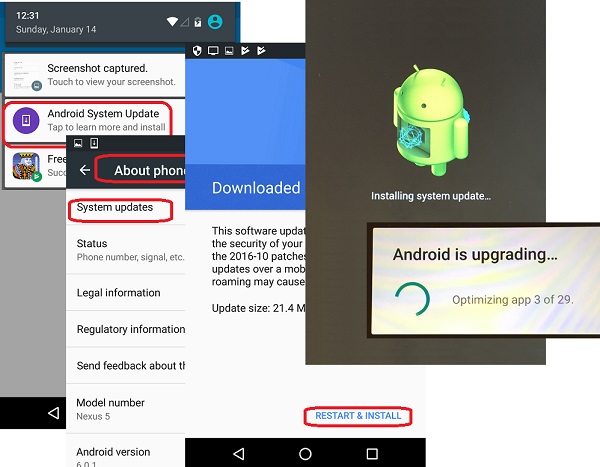
1. Tap on the "Android System Update" alert. Or go to "Settings > About phone > System updates". You see the "Downloaded and verified" message screen:
2. Tap on "RESTART & INSTALL". You see the phone getting restarted.
3. Wait for the phone finishing restart. You see the "Installing system update..." screen.
4. Then you see the "Android is upgrading..." message.
5. Wait for the update process to finish. The Android system is updated on your LG phone.
The following picture shows you how to
Update Android System on you LG Phone:
⇒ Download and Install App on LG Phone
2018-02-01, ∼4324🔥, 0💬
Related Topics: