Take Picture with LG Phone Camera
How to Take Picture with LG Phone Camera I am new to LG phone camera.
✍: FYIcenter.com
You can follow this tutorial to take pictures with the camera on your LG phone.
1. Open your LG phone.
 2. Tap camera "Camera" icon on the home screen,
or inside the "Applications" icon.
2. Tap camera "Camera" icon on the home screen,
or inside the "Applications" icon.
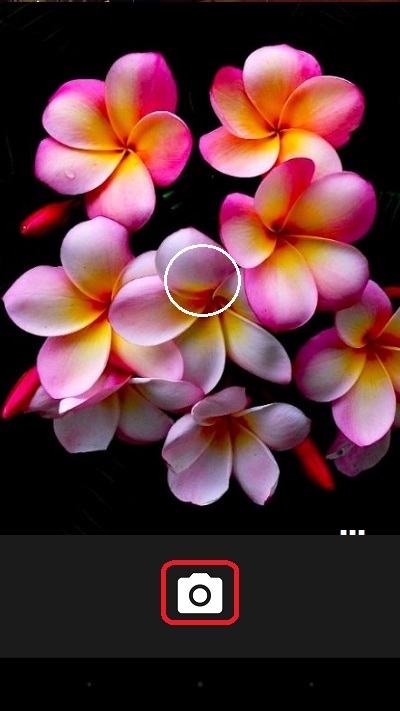
3. Point the back of your phone to the object you want to take picture. You see the object displayed on the screen.
4. Hold the phone still. Your phone will automatically focus to the center of the picture and calculate the exposure time.
5. Press the shutter icon on the screen or the press the "Volume Up" on the side of the phone to take the picture.
The following picture shows you how to Take Picture with LG Phone Camera:
⇒ Picture Options with LG Phone Camera
2018-02-21, ∼2994🔥, 0💬
Related Topics:

💬 2019-04-13 FYIcenter.com: @Angela, what are the symptoms? Are there any error messages?
💬 2019-04-11 Angela self: I'm being hacked by the LG phone and windows on computer help