Managing iCloud Drive Files with iCloud for Windows
How to manage iCloud Drive files with iCloud for Windows?
✍: FYIcenter.com
 Managing iCloud Drive files with iCloud for Windows is very easy,
since it maps iCloud Drive as a file folder on the local Windows system.
Here are steps you can follow:
Managing iCloud Drive files with iCloud for Windows is very easy,
since it maps iCloud Drive as a file folder on the local Windows system.
Here are steps you can follow:
1. Make sure iCloud for Windows is running on your PC.
2. Run "iCloud Drive" from the program search box to open iCloud Drive as a file folder. You see some folders like: Keynote, Numbers, Pages and others created by yourself.
3. Double-click any folder where you want to manage files. You see the contents of that folder.
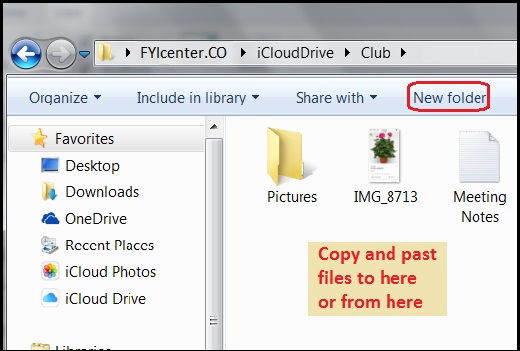
4. Click "New folder" in menu area to. create a new sub folder.
5. Copy and paste any files into here to upload it to iCloud Drive from the local system.
6. Copy and paste any files from here to other folders to download it from iCloud Drive to the local system.
7. Select a file or folder and press the Delete key to delete the selected file or folder from iCloud Drive. You need to confirm to delete, because the deleted file will be removed permanently from iCloud Drive.
The picture below shows you how to manage iCloud Drive files with iCloud for Windows:
⇒ Accessing iCloud Drive with iPhone
2017-07-21, ∼3033🔥, 0💬
Related Topics:

💬 2021-10-10 FYIcenter.com: @Tim, What is the iOS version of your iPhone?
💬 2021-10-05 Tim: I can’t find updates in corner of App Store page

