Adjust iPhone Camera Focus Manually
How to adjust camera focus manually when taking photos with my iPhone?
✍: FYIcenter.com
 When you taking photos with your iPhone, the camera will automatically
set focus on the subject in the center of the screen.
When you taking photos with your iPhone, the camera will automatically
set focus on the subject in the center of the screen.
In most cases, the subject in the center is the subject you want to focus on. But if you want the camera to focus on a subject on other parts of the screen, you can manually set the focus by following these steps:
1. Hold your iPhone camera still.
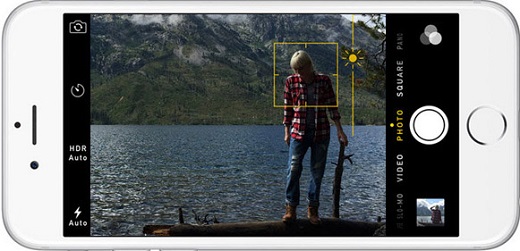
2. Tap on the screen where the subject you want to focus is located. The camera will adjust the focus to the subject you tapped on. A small yellow box is displayed to show you the spot you tapped on.
3. Wait for the camera to finish the focus change and you see the subject clearly displayed on your screen.
4. Tap on the shutter icon to take the photo.
The picture below shows you how to adjust iPhone camera focus manually (source: mylio.com):
⇒ Adjust iPhone Camera Exposure Manually
2017-10-23, ∼8408🔥, 0💬

