Turn on iPhone Camera Grid
Q
Where to turn on camera grids on my iPhone to help me taking better photos?
✍: FYIcenter.com
A
 iPhone can display a grid of 2 horizontal lines and 2 vertical lines on your screen
to help you taking better photos:
iPhone can display a grid of 2 horizontal lines and 2 vertical lines on your screen
to help you taking better photos:
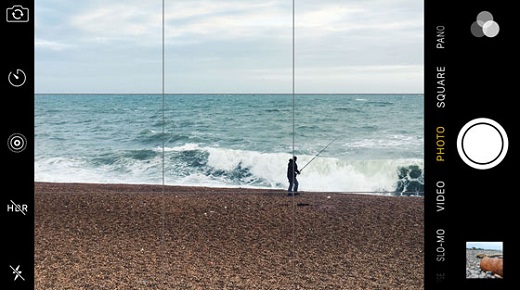
- Grid lines give you straight line references to help you line up objects straight horizontally like a sea line, or vertically like a tower.
- Grid lines divide the screen into 3 equal parts horizontally and vertically. This helps you to locate interesting subjects a third of the way from left, right, top, or bottom edge. This is called the "rule of thirds" used by photographers.
You can follow these steps to turn on the grid in you iPhone camera:
1. Tap on "Settings > Photos & Camera". You see the "Photos & Camera" screen.
2. Tap on "Grid" to turn it on.
3. Try to your camera now. You see a grid dividing the screen into 3 x 3 equal parts.
The picture below shows you how camera grid can help you to take better photos
(source: iphonephotographyschool.com):
⇒ Geotag Photos - Location Service for iPhone Camera
2017-10-23, ∼6111🔥, 0💬

