Get Apple ID on iTunes without Credit Card
How to apply for Apple ID on iTunes without a credit card? It asks for a credit card. But I am not ready to buy anything.
✍: FYIcenter.com
 If you are applying for Apple ID with iTunes,
it will ask you for credit card number.
So Apple is ready to charge whenever you click and buy a music download.
If you are applying for Apple ID with iTunes,
it will ask you for credit card number.
So Apple is ready to charge whenever you click and buy a music download.
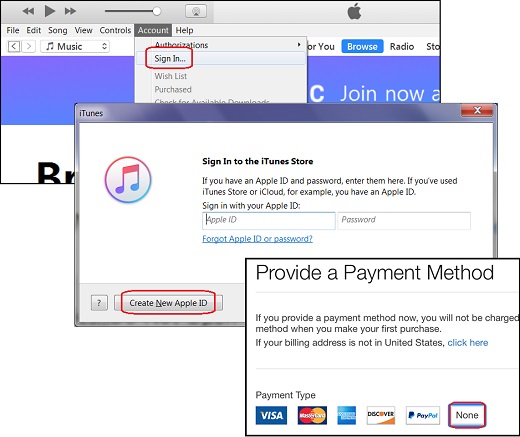
If you don't want to provide your credit card information, you can follow these steps:
1. Run iTunes and click "Account > Signin" in the top menu. You see the signin screen showing up.
2. Click "Create New Apple ID" button. You see the welcome screen showing up.
3. Click "Continue" button. You see the term and condition screen showing up.
4. Read and check the "I have read and agree..." checkbox. Then click "Agree" button. You see the Apple ID application form showing up.
5. Fill in the application form and click "Continue". Remember to write done your password, security questions and answers on paper. If you forget your password, you recover it with security questions. But if you forget your security questions and answers, there is no way to reset them.
6. Click "None", when you are asked to provide a payment method.
7. Go to your email box which you used in the application form and look for the email verification message from Apple.
8. Finish the application process with the verification code from the email.
The picture below shows you the main steps of applying Apple ID on iTunes:
⇒ Single or Multiple Apple IDs
⇐ Apply for Apple ID on appleid.apple.com
2017-04-20, ∼3955🔥, 0💬