Download Numbers Spreadsheet from iCloud in PDF Format
How to download a Numbers spreadsheet from iCloud in PDF format? I need to send it to a friend who can print it in PDF format.
✍: FYIcenter.com
 You can download and save a Numbers spreadsheet from iCloud
in PDF format by following these steps:
You can download and save a Numbers spreadsheet from iCloud
in PDF format by following these steps:
1. Login to https://www.icloud.com with a Web browser.
2. Click the "Numbers" box. You see a plus sign box and a list of your existing spreadsheets.
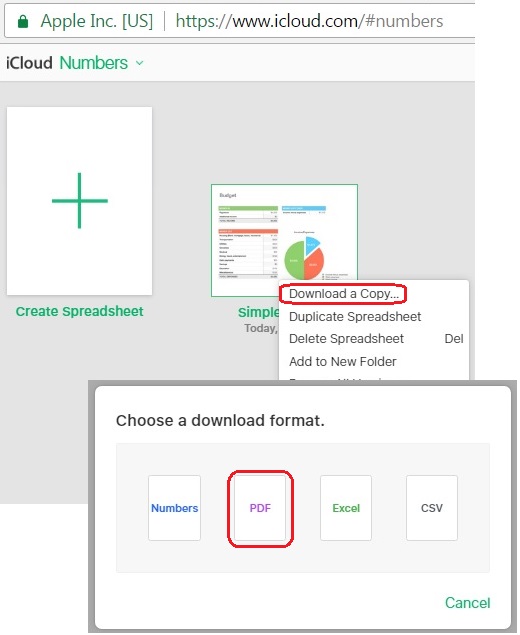
3. Right-mouse click on the Numbers spreadsheet you want to download. You see the context menu showing up.
4. Select "Download a Copy..." from the context menu. You see the download format options showing up.
5. Select the "PDF" option. You see the browser download window showing up.
6. Select a folder on your local computer to save the file.
7. Verify the saved file with a PDF viewer.
The picture below shows you how to download and save a Numbers spreadsheet from iCloud in PDF format:
⇒ Download Numbers Spreadsheet from iCloud in Excel Format
2017-11-11, ∼3505🔥, 0💬
Related Topics: