Changing Payment Info in iTunes Store
How to view and change my payment information for my iTunes Store account? I want to use a different credit card number to pay my downloads.
✍: FYIcenter.com
Changing the credit card number of expiration date for your iTunes Store account from your iPhone is easy.
1. Tap "Settings > iTunes & App Store" on your iPhone. You will see your Apple ID and iTunes and Apple Store settings.
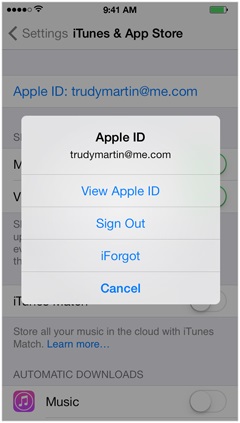
2. Tap on your Apple ID. You will see a menu displayed.
3. Tap "View Apple ID". And enter your password. You will your account settings.
4. Tap on "Payment Information". You will see your current credit card information.
You can add new credit card or change the expiration data or billing address of the current credit card.
The picture below shows you how to update iTunes store payment information on iPhone:
2016-02-18, ∼2635🔥, 0💬
Related Topics:

💬 2023-04-18 Aswanth: Creat my apple id
💬 2023-02-24 Usman: Dear apple team i need an apple id to use iCloud to backup my poto
💬 2023-02-24 Usman: Dear apple team my apple I'd have not creat please create my apple I'd