Check Wi-Fi Connection Strength and Details
Q
How to Check Wi-Fi Connection Strength and Details on Android?
✍: Guest
A
 Any time your phone has an open Wi-Fi connection, you can check to see
signal strength, link speed (how fast data is transferred), which security type
is being used and the IP address.
Any time your phone has an open Wi-Fi connection, you can check to see
signal strength, link speed (how fast data is transferred), which security type
is being used and the IP address.
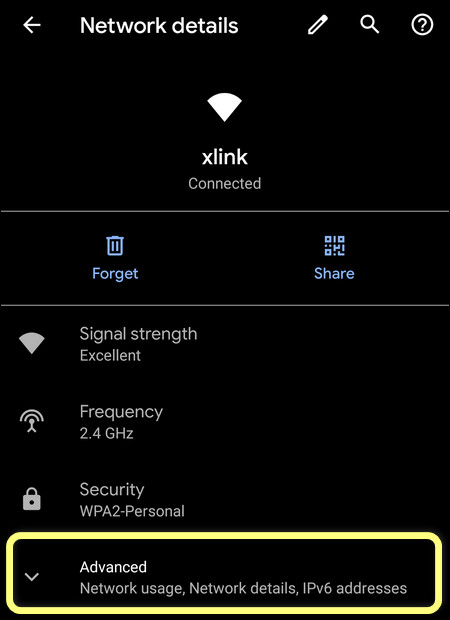
To do this, open the settings from the home screen, tap 'Wi-Fi' and look for the SSID of the network you are connected to. Tap the SSID and a box will open which displays all of the information about the Wi-Fi connection.
Tap on "Advanced" to see more details like: Network usage, Network IP address, etc.
⇒ Public Wi-Fi Network Notification
⇐ What Is WPS (Wi-Fi Protected Setup)
2013-06-28, ∼7652🔥, 0💬
Related Topics: