Categories:
Android (32)
Apple (iPhone) (829)
Apps (26)
BlackBerry (3)
General (438)
HTC (6)
Huawei (83)
LG (43)
Motorola (50)
Nokia (4)
Palm (10)
Samsung (163)
Sony (1)
Technology (17)
Windows Phone (209)
ZTE (5)
Online Tools:
Tutorial Collections:
Other Resources:
List and Remove Running Apps
How to list and remove running apps?
✍: FYIcenter.com
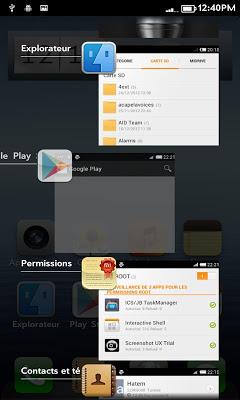
You list the running apps on Samsung tablets, you can:
Press and hold "Home" button.
You see a list of running apps displayed.
To resume a running app from the list: Tap it.
To remove a running app from the list: Swipe it to left or right.
2026-07-30, ∼1803🔥, 0💬
Popular Posts:
How to access iCloud Drive with a Web browser? If you have an Apple device and an Apple ID account, ...
What is the SIM card? And what is the SIM number? A SIM (Subscriber Identity Module) card is an inte...
Where to lookup for the SIM Card Issuer company and contact information? If you have the country/reg...
When was Samsung Galaxy S5 phone first released? How does Samsung Samsung Galaxy S5 phone look like?...
iPhone -Contacts - How can I add a custom label to iPhone contact numbers? The iPhone Contacts app p...